LiveBook in Practical Use
Most ChessBase´26 users will probably use the LiveBook in connection with opening training, together with the Opening Book and/or the Reference function. That’s also how it is described in the online manual. Here’s a brief example:

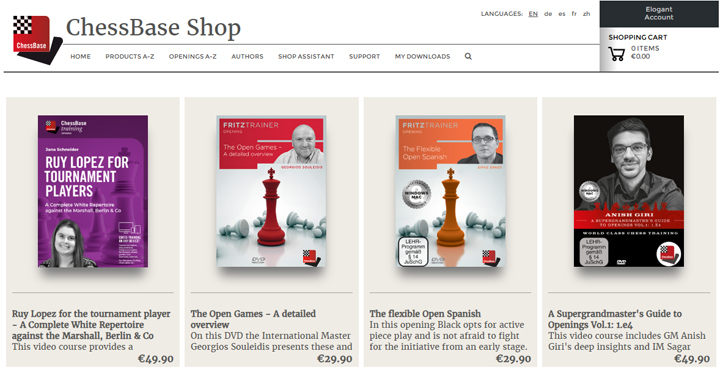
This Spanish variation appeared recently in a game between Vincent Keymer and Frederik Svane at the Grand Swiss Tournament in Samarkand. On the right-hand side, the statistics for the game are displayed, and with the practical "Find in Shop" button, products on the Spanish Opening can be easily located in the shop (anyone wanting more detailed results can quickly find them under "Openings A–Z"):
EXPAND YOUR CHESS HORIZONS
Data, plans, practice – the new Opening Report In ChessBase there are always attempts to show the typical plans of an opening variation. In the age of engines, chess is much more concrete than previously thought. But amateurs in particular love openings with clear plans, see the London System. In ChessBase ’26, three functions deal with the display of plans. The new opening report examines which piece moves or pawn advances are significant for each important variation. In the reference search you can now see on the board where the pieces usually go. If you start the new Monte Carlo analysis, the board also shows the most common figure paths.
Endgame Analysis with LiveBook
In this installment, however, the focus is on a less well-known but still very useful application of the LiveBook: endgame analysis with LiveBook.
In the game mentioned above between the two German top players, the following endgame arose, which we have simply brought up on the board here using "Set up position (S)":
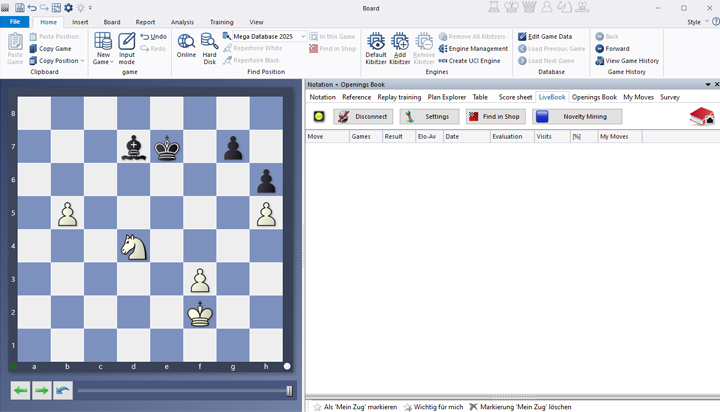
At this point, we first notice that we see nothing! The results area on the right is empty. This is because, when you are logged in with your account, LiveBook accesses the Seven-Piece Endgame Database (if you are not connected, click on "Connect" — to the right of the board, above the results window). However, there are still nine pieces on the board.
Perfect endgame analysis and a huge increase in engine performance: Get it with the new Endgame Turbo 5! This brings the full 6-piece Syzygy endgame tablebases on a pendrive. Just plug it in a USB socket and you are set!
As so often in the endgame, the question may arise of how the position should be evaluated once the minor pieces are exchanged. Is the pawn advantage then enough to win? In this example the answer may seem straightforward, but the same approach can be applied to any more complicated endgame. We will demonstrate this with several further positions:

Even while "rebuilding" the position, you will see games appear in the results window on the right (provided the checkmark for "Search automatically" is activated) in which this basic structure occurred (see also: Set up positions and analyze).
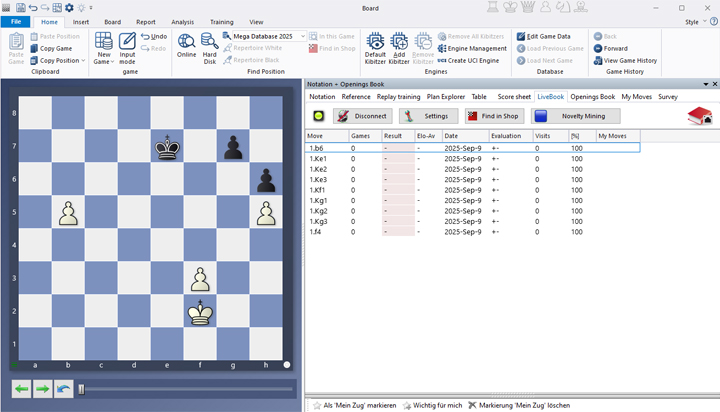
Without the pieces, White’s position is simply winning thanks to the passed pawn and the extra pawn. This is also clear in the results display, which is now active for this seven-piece position. But what does it look like without the b-pawn?

In this powerful new course, endgame expert Karsten Müller teams up with rising star Leon Mendonca to deliver what truly matters: 10 essential rules that every player must know.
Endgames decide more games than any opening preparation ever will and yet they are often the least understood phase of chess. In this powerful new course, endgame expert Karsten Müller teams up with rising star Leon Mendonca to deliver what truly matters: 10 essential rules that every player must know.
Free Video sample: Introduction
Free Video sample: Activate the king
Suddenly White is worse and has to play accurately in order not to lose. As you can see in the "Evaluation" column, there are five drawing moves and three losing moves. As usual, you can click through the line of play by selecting the row with the move you want. You can also click once or several times on "Evaluation." The column will then be sorted into winning, drawing, and losing lines:

Very practical, finally, is the option to search for a position in the MegaDatabase 2026: to do this, move the mouse pointer over the board, right-click, and select "Find position in MegaDatabase 2026…" (shortcut: SHIFT+F7):

Somewhat surprisingly, this position is not found in the MegaDatabase 2026. It looks different, however, if you remove the f-pawn and move the king two squares forward:

Here at the top right you see the variation statistics, and below them the corresponding games including a mini-board for preview. How to adjust the windows to your preferred size has already been explained earlier in this series: Standard layout or custom layout?
Conclusion
The LiveBook in ChessBase´26 is too often misunderstood as merely an opening tool. With just a few simple steps, however, you can also use it effectively for comprehensive endgame training. Give it a try and improve your endgame knowledge by quickly seeing, in any position, which moves are correct and which are not.
------
ChessBase has developed over decades to become what it is now in its 2026 version. The program has countless options, which we will present here in small portions – so you can design your interface for pleasant daily use and keep learning about new options and how to use them to get the most out of ChessBase´26 and save time.
We hope that this tip will help you to have more fun and be more successful when using ChessBase´26. You can find more tips and hints on our support pages and FAQ pages.
All parts of the series and more links:
In this powerful new course, endgame expert Karsten Müller teams up with rising star Leon Mendonca to deliver what truly matters: 10 essential rules that every player must know.
Endgames decide more games than any opening preparation ever will and yet they are often the least understood phase of chess. In this powerful new course, endgame expert Karsten Müller teams up with rising star Leon Mendonca to deliver what truly matters: 10 essential rules that every player must know.
Free Video sample: Introduction
Free Video sample: Activate the king
- Beginner´s Tips Part 1: Entering and Saving Your Own Games
- Beginner´s Tips Part 2: Insert variations and add engines
- Beginner´s Tips Part 3: Insert variations from references and engines
- Beginner´s Tips Part 4: Figurines and Colours
- Beginner´s Tips Part 5: Annotations
- Beginner´s Tips Part 6: Quick access toolbars and variation hierarchies
- Beginner´s Tips Part 7: Organising databases!
- Beginner´s Tips Part 8: Together what belongs together...!
- Beginner´s Tips Part 9: Tactical Analysis
- Beginner´s Tips Part 10: Standard Layout or Custom Layout
- Beginner's Tips, Part 11: Multitasking with several windows
- Beginner's Tips, Part 12: Arrows and marks
- Beginner's Tips, Part 13: Powerbooks and Powerbases
- Beginner's Tips, Part 14: Save resources with remote engines
- Beginner's Tips, Part 15: Setting up and analysing positions
- Beginner's Tips, Part 16: Setting up and analysing positions (Part 2)
- Beginner's Tips, Part 17: Choosing your board design
- Beginner's Tips, Part 18: What the mouse can do!
- Beginner's Tips, Part 19: Find model games for training
- Beginner's Tips, Part 20: Award medals to your best games!
- Beginner's Tips, Part 21: Maximum Training Effect with the Power Tool "Replay Training" (Part 1)
- Beginner's Tips, Part 22: Maximum training effect with the ‘Replay Training’ power tool (Part 2)
- Beginner's Tips, Part 23: Stay up to date with program updates
- Beginner's Tips, Part 24: Always get the latest games via update
- Beginner's Tips, Part 25: Customizing your view – how to see what matters
- Beginner's Tips, Part 26: Null moves: The art of doing nothing
- Beginner's Tips, Part 27: Creating Effective Training Material (Part 1)
- Beginner's Tips, Part 28: Creating Effective Training Material (Part 2)
- Beginner's Tips, Part 29: Creating Effective Training Material (Part 3)
- Beginner's Tips, Part 30: Use "Folders"
- ChessBase´26: A Players Guide (1)
- ChessBase´26: A Players Guide (2)
- ChessBase´26: A Players Guide (3)
- ChessBase´26: A Players Guide (4)
- ChessBase´26: A Players Guide (5)
- Videos:
Matthias Wuellenweber on all new functions for ChessBase 26
ChessBase 26 - The interview with Matthias Wuellenweber
Matthias Wuellenweber - The Complete Guide to the ChessBase 26 Opening Report
Matthias Wuellenweber - The Complete Guide to the ChessBase 26 Monte-Carlo-Analysis
Dorian Rogozenco: How a GM uses the new ChessBase 26 opening report
Dorian Rogozenco: How a Grandmaster Uses the New ChessBase´26 Monte-Carlo Analysis
In this video course, GM Surya Ganguly joins IM Sagar Shah and drawing from his colossal experience, shares some uncommon endgame wisdom. The material mostly features positions with rook against rook and a pawn, and starts by covering the fundamentals.



.jpeg)















.jpeg)