Sharing data with others
In parts one and two of this tutorial mini-series we showed how to compile training material effectively with ChessBase´26. But just as important — if you are not working only for your own training purposes — is that your students or clubmates also receive access to the data.
Ways of sharing training data
- Sending databases by e-mail
With ChessBase´26 you can send databases and other files directly from the program, provided your standard e-mail program is "MAPI-enabled."
If you do not use a MAPI-enabled standard e-mail program, you can simply go through your mail program and attach the files in the usual way.
Note on "MAPI-enabled":
To send databases from ChessBase´26 your e-mail program must be MAPI-enabled, i.e. it must support a specific interface.
For example:
– You click "Send invoice by e-mail" in a program →
– The program passes the e-mail + attachment via MAPI to your e-mail program →
– A new message automatically opens there with the file already attached.
Programs that are MAPI-enabled include, for example, classic Outlook and Mozilla Thunderbird. If in doubt, check online whether your e-mail program supports MAPI.
The most important options with a MAPI-enabled e-mail program are therefore the following:
You can send the entire database directly from "My Databases":
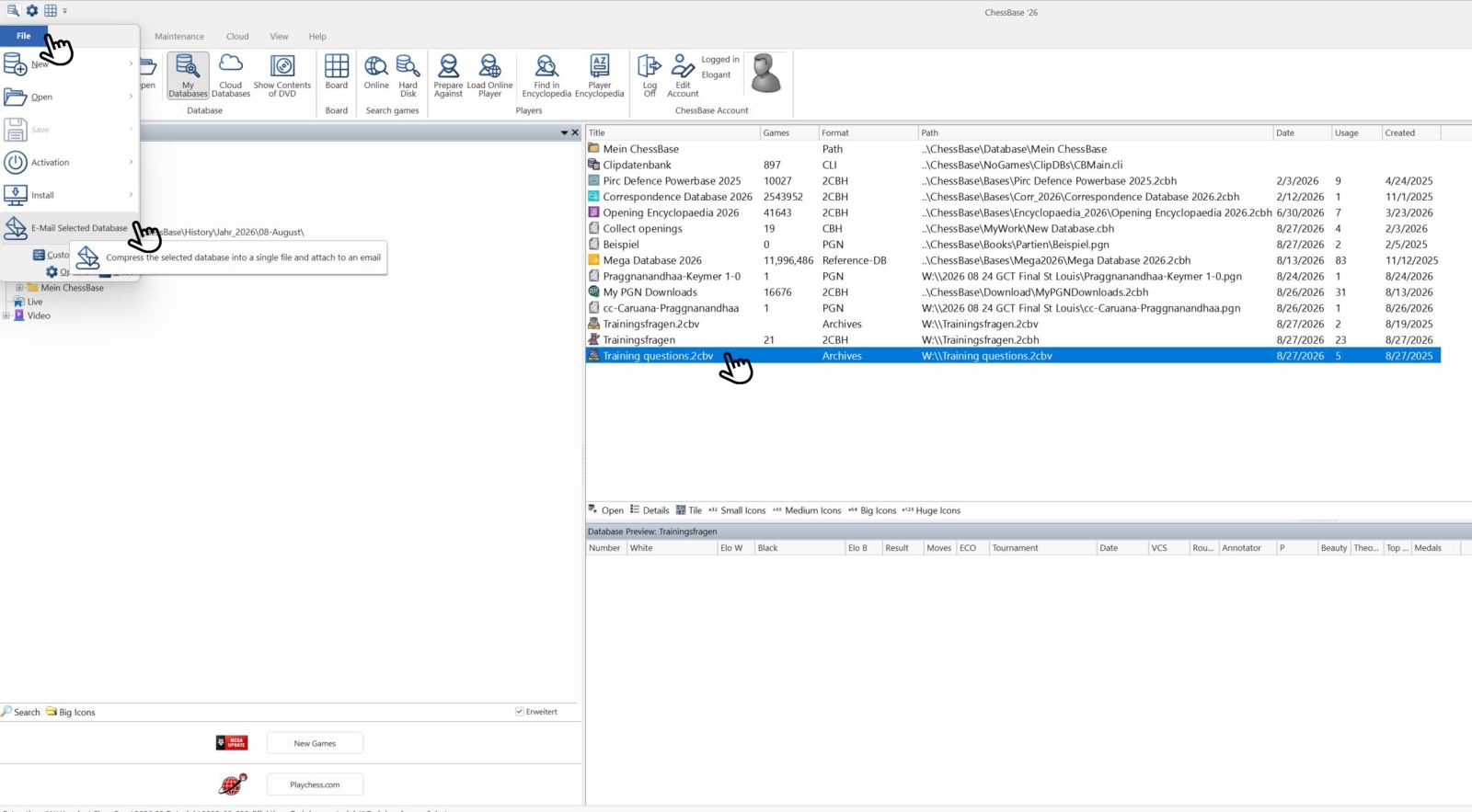
To do this, select the desired database in "My Databases."
Important: An archive of the database is created (cbv or 2cbv). Only in this way can the complete database be sent in a single file (the original database consists of several individual files). A common mistake by users is to send only the cbh (= ChessBase Header) file by e-mail. The recipient cannot open this, because the cbh is only one part of the complete database.
Then, in the ChessBase main menu, choose "File" and then the bottom option "E-Mail." An e-mail opens with the selected database as an attachment. In MS Outlook it looks like this:
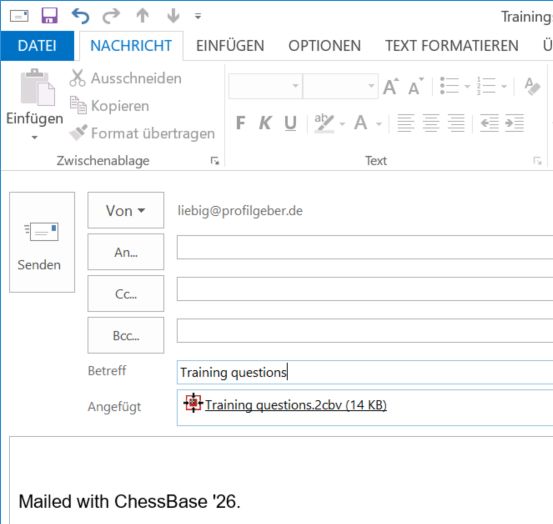
In this e-mail window you can now, as usual, add recipients and enter text. You can also attach additional files and then send the message as you normally would.
You can send one or more games from the database as follows:
Open the database by double-clicking on it in the database list. The game list of the database will then open:

You can therefore select and send a single game or several games. Using the SHIFT key and the left mouse button, or SHIFT together with the cursor keys on the keyboard, you can also select entire blocks (see games 17–21). If, in addition, you want to select individual games as described above, you first mark the block as explained, and then add the single games with CTRL and the left mouse button.
When everything you want to send is selected, go again to "File" and then to "E-Mail," and proceed as described above.
2. Copying databases to the cloud
We will look at the use of the "Cloud Databases" option in more detail in a later part of the tutorial. For cases where both sender and recipient have a ChessBase version with the Cloud Databases option, this is the most practical and fastest way of transferring:
Copy the database in "My Databases" with CTRL+C. Then click on "Cloud Databases."
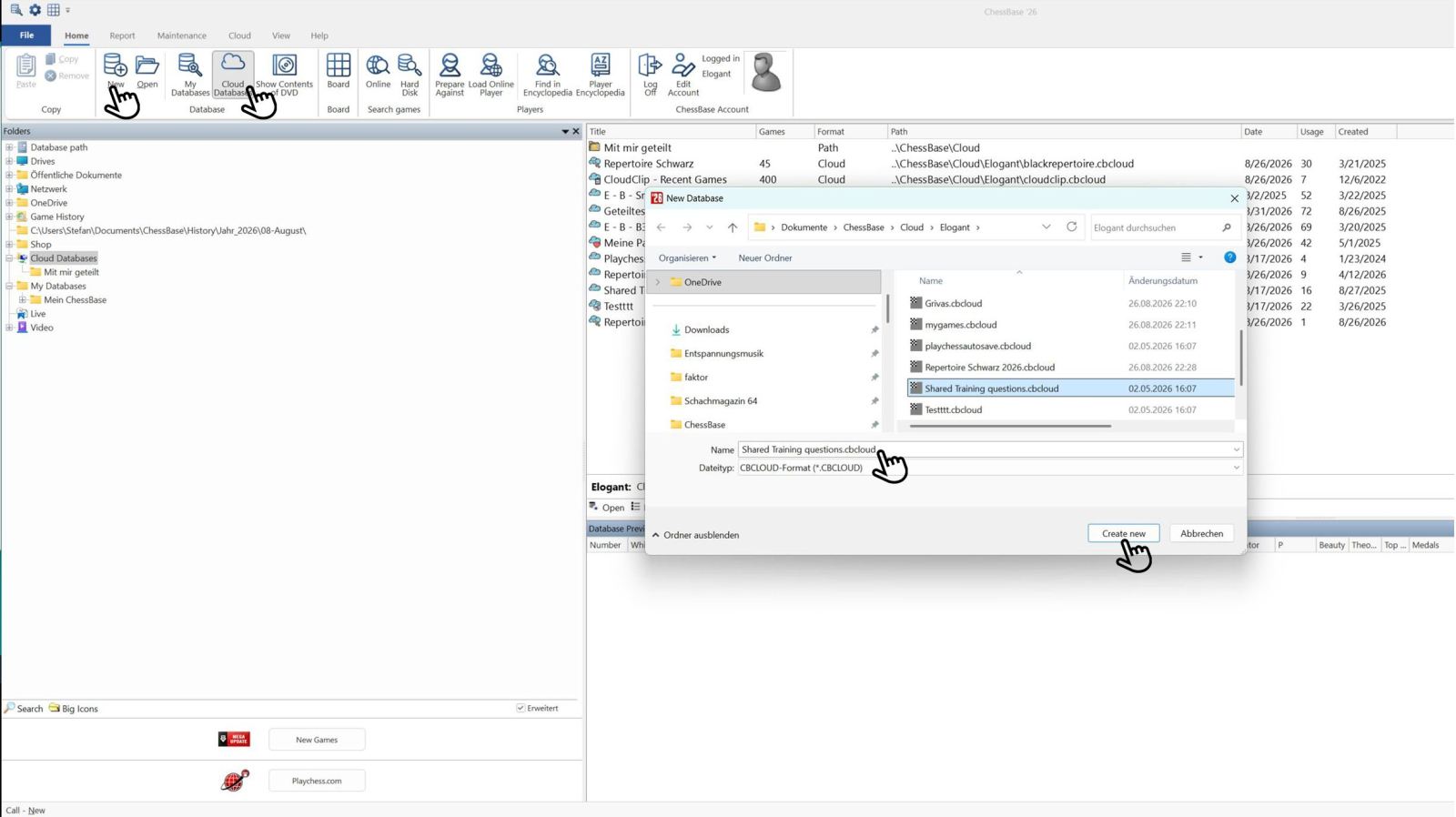
If you now click on "New" in the upper area, the menu window shown below will open. Here you can choose a name and create the new cloud database with "Create New." You can then insert the copied database there with CTRL+V or via the "Paste" option in the menu. The following window will then appear:

Now select the games you want to insert, and the following view will appear:

To share the database, go to the database in the Cloud Databases overview and right-click on it (shortcut CTRL+SHIFT+ALT+S) …

… and then select "Share Privately." Then click on "Add":

Now enter the recipient’s account and click "OK."
3. Sending from the game window
There is also the option in a game window to go via "File," "Send," and "Send Game" to send a game and diagrams as CBV, PGN, TXT, HTML, RTF, or diagram as graphic (the different file formats will be explained in a future part). Here too, the e-mail program must be MAPI-enabled.

Via "File," "Send," and "Send Game," the following window opens:

When the desired game options have been selected, a mail window will open again after clicking OK:

It works the same way with "Send Position" when you click on "Position bitmap":

… and the corresponding mail window then looks like this, or something similar:

It’s best to try out the three parts of this mini-series again — it takes a little practice. But the quick creation of material and the convenient ways of sharing files with your students make the work much easier. There are many paths to successful training — with ChessBase´26 you avoid unnecessary detours and save a lot of time for your concrete training preparation …
“Mate is great!” – Tactical training with Oliver Reeh, “The 8th rank” – Andy Woodward analyses his game against Magnus Carlsen from TePe Sigeman 2026, “A modern Nimzo-Indian” – Andrei Volokitin introduces readers to "his" system and much more!
ChessBase Magazine offers top-class training material for club players and professionals! World-class players analyse their finest games and explain the ideas behind the moves. Opening specialists present the latest trends in opening theory and exciting ideas for your repertoire. Master trainers in tactics, strategy and endgames show you exactly the tricks and techniques you need to become a successful tournament player! Available as a download (including the magazine as a PDF file).
Included: CBM #232 as a “ChessBase Book” for iPad, tablet, Mac etc.! At books.chessbase.com

------
ChessBase has developed over decades to become what it is now in its 2026 version. The program has countless options, which we will present here in small portions – so you can design your interface for pleasant daily use and keep learning about new options and how to use them to get the most out of ChessBase´26 and save time.
We hope that this tip will help you to have more fun and be more successful when using ChessBase´26. You can find more tips and hints on our support pages and FAQ pages.
All parts of the series and more links:
The premiere chess database with over 11.7 million games
The ChessBase Mega Database 2026 is the premiere chess database with over 11.7 million games from 1475 to 2025 in high quality.
- Beginner´s Tips Part 1: Entering and Saving Your Own Games
- Beginner´s Tips Part 2: Insert variations and add engines
- Beginner´s Tips Part 3: Insert variations from references and engines
- Beginner´s Tips Part 4: Figurines and Colours
- Beginner´s Tips Part 5: Annotations
- Beginner´s Tips Part 6: Quick access toolbars and variation hierarchies
- Beginner´s Tips Part 7: Organising databases!
- Beginner´s Tips Part 8: Together what belongs together...!
- Beginner´s Tips Part 9: Tactical Analysis
- Beginner´s Tips Part 10: Standard Layout or Custom Layout
- Beginner's Tips, Part 11: Multitasking with several windows
- Beginner's Tips, Part 12: Arrows and marks
- Beginner's Tips, Part 13: Powerbooks and Powerbases
- Beginner's Tips, Part 14: Save resources with remote engines
- Beginner's Tips, Part 15: Setting up and analysing positions
- Beginner's Tips, Part 16: Setting up and analysing positions (Part 2)
- Beginner's Tips, Part 17: Choosing your board design
- Beginner's Tips, Part 18: What the mouse can do!
- Beginner's Tips, Part 19: Find model games for training
- Beginner's Tips, Part 20: Award medals to your best games!
- Beginner's Tips, Part 21: Maximum Training Effect with the Power Tool "Replay Training" (Part 1)
- Beginner's Tips, Part 22: Maximum training effect with the ‘Replay Training’ power tool (Part 2)
- Beginner's Tips, Part 23: Stay up to date with program updates
- Beginner's Tips, Part 24: Always get the latest games via update
- Beginner's Tips, Part 25: Customizing your view – how to see what matters
- Beginner's Tips, Part 26: Null moves: The art of doing nothing
- Beginner's Tips, Part 27: Creating Effective Training Material (Part 1)
- Beginner's Tips, Part 28: Creating Effective Training Material (Part 2)
- ChessBase´26: A Players Guide (1)
- ChessBase´26: A Players Guide (2)
- ChessBase´26: A Players Guide (3)
- ChessBase´26: A Players Guide (4)
- ChessBase´26: A Players Guide (5)
- Videos:
Matthias Wuellenweber on all new functions for ChessBase 26
ChessBase 26 - The interview with Matthias Wuellenweber
Matthias Wuellenweber - The Complete Guide to the ChessBase 26 Opening Report
Matthias Wuellenweber - The Complete Guide to the ChessBase 26 Monte-Carlo-Analysis
Dorian Rogozenco: How a GM uses the new ChessBase 26 opening report
Dorian Rogozenco: How a Grandmaster Uses the New ChessBase´26 Monte-Carlo Analysis
YOUR PERSONAL CHESS COACH - Whether you’re taking your first steps into the world of club chess, or already playing at a tournament level: with FRITZ, you can train more efficiently, intelligently and with a more personalised approach than ever before.
FRITZ is more than just a chess engine – it’s a training revolution! Whether you’re taking your first steps into the world of club chess, or already playing at a tournament level: with FRITZ, you can train more efficiently, intelligently and with a more personalised approach than ever before.
* COMPETE AGAINST LEGENDS
* FRITZ is fun! BETTER CALCULATIONS – EVEN UNDER TIME PRESSURE!
* STYLE SIMULATION AT THE HIGHEST LEVEL
* EVEN STRONGER. EVEN MORE BEAUTIFUL. EVEN MORE DIRECT.




.jpeg)