Replay Training in ChessBase is much more than simply playing through master games—it's an interactive training system that puts you right in the middle of the action. Instead of passively following the moves, ChessBase challenges you to find the best continuations yourself. As soon as you enter a move, the program tells you whether it was correct—or whether there was a stronger alternative. This way, you experience the game actively, with maximum learning impact.
Select a game and start Replay Training!
Getting started with Replay Training is easy. Simply select any game from your database. Using the game Tal vs. Smyslov—which you may remember from the previous tutorial—we'll show you how to proceed. You can view the entire game in the Replayer:
On this DVD Dorian Rogozenco, Mihail Marin, Oliver Reeh and Karsten Müller present the 8. World Chess Champion in video lessons: his openings, his understanding of chess strategy, his artful endgame play, and finally his immortal combinations.
Smyslov cultivated a clear positional style and even in sharp tactical positions often relied more on his intuition than on concrete calculation of variations. Let our authors introduce you into the world of Vasily Smyslov.
In the notation window of ChessBase´26, start Replay Training mode via the menu. Even before the first move, you can set specific parameters: for example, whether you want to play as White and/or Black, and whether you'd like to receive hints.
We'll explain the remaining tools in a later tutorial and start here from the initial position:
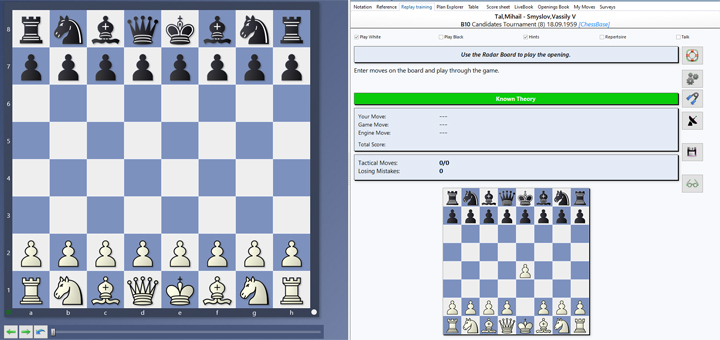
It wouldn't make much sense, of course, to guess the first move from the starting position and have it evaluated. While the ECO code might give you a hint on how the game begins, the more useful tool is the "radar board" at the bottom, which always shows an upcoming position—so in this case, the game starts with 1.e4.
Above the preview board, you'll see the game data, the hint bar, and the evaluation box for your suggested moves, starting with the green bar that shows the evaluation of the current position.
We play a few moves on the main board, respond to Black's replies, and observe how the display changes accordingly:
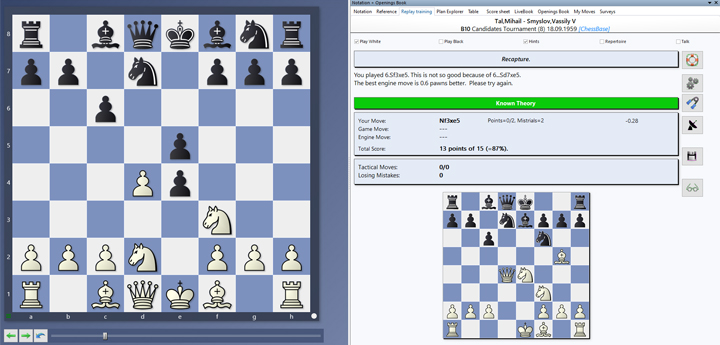
We followed Tal's moves up to his novelty 5.d4. On move six, we played Nxe5. ChessBase´26 immediately corrected this and replaced it with the stronger move Nxe4. At the same time, both moves were added to the evaluation box, and the score now shows less than a full 100%—meaning we didn't find the best continuation. However, just above that, you can see a note saying that Nxe5 wasn't a mistake either—so we still received partial credit for the move.
A few moves later, the position might look like this:
EXPAND YOUR CHESS HORIZONS
Data, plans, practice – the new Opening Report In ChessBase there are always attempts to show the typical plans of an opening variation. In the age of engines, chess is much more concrete than previously thought. But amateurs in particular love openings with clear plans, see the London System. In ChessBase ’26, three functions deal with the display of plans. The new opening report examines which piece moves or pawn advances are significant for each important variation. In the reference search you can now see on the board where the pieces usually go. If you start the new Monte Carlo analysis, the board also shows the most common figure paths.
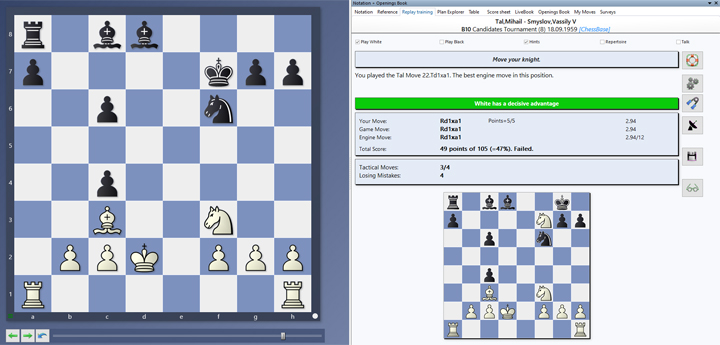
We can see that White now has a clearly better position. However, we only reached this point with computer assistance. The score clearly shows that several mistakes were made while guessing the moves, which has negatively impacted the statistics.
We also notice that the radar board is now empty—this typically happens after the opening phase. However, it can be permanently reactivated by clicking on the radar screen (we'll cover that in more detail in the next tutorial).
In the meantime, text-based hints are still available, so you can easily find your way and decide for yourself how much you want to think independently and how much support you'd like to use.
During training, you receive continuous feedback:
-
For each move, you'll see whether your choice matches the original game. This allows you to quickly recognize where your thinking aligns with that of a grandmaster or where it differs. These insights strengthen your chess intuition and help you evaluate typical positions more effectively.
-
At the end of the game, a summary shows your overall performance: how many moves were correct and where there's room for improvement.
Pro tip
Train exactly what you want to train:
For example, you can start from move 20—right when a game enters its critical phase. Or you can focus specifically on the middlegame to practice tactical patterns and strategic ideas. The flexibility of Replay Training makes it an ideal tool that you can tailor precisely to your training goals.
Conclusion
 The free app from ChessBase! ChessBase Mobile has everything you need as a chess player on the go:
access your chess data in cloud databases - and 13 million games.
The free app from ChessBase! ChessBase Mobile has everything you need as a chess player on the go:
access your chess data in cloud databases - and 13 million games.
ChessBase Mobile has everything you need as a chess player on the go:
- Access the ChessBase online database - with more than 13 million games: search for players, positions, openings etc.
- Save your own games and analyses in cloud databases
- Synchronise your personal databases across all your devices
- Analyse your games with the built-in engine
- Live opening book: use the most comprehensive and up-to-date statistics for every opening position
- Access your opening repertoire in the cloud: create and edit your personal opening repertoire
- 300 opening overviews, with repertoire suggestions: get started with new systems!
- Practise opening variations with three modes.
- Advanced notation: add comments, symbols, variations, arrows and markings to your games
- Advanced sharing options: share games and positions via link, image, GIF, FEN or QR code
- PGN compatibility: upload and download games or databases as PGN files
For beginners, Replay Training offers an excellent introduction to active learning. Instead of just watching games, you play them yourself—without any risk, but with great learning benefits. Mistakes are immediately noticeable, and variations become more memorable through repetition. And if you use Replay Training regularly, you'll noticeably gain confidence in your move selection and overall thinking process.
In the end, Replay Training is more than just a nice extra—it's a tool that helps you learn to think like a master. You'll develop the ability to recognize patterns, calculate variations in advance, and avoid common mistakes. And the best part: you control the pace, content, and intensity of your training.
Give it a try. Open a game, start Replay Training—and experience how passive replay turns into active, effective chess learning. You'll be surprised how quickly your playing strength improves.
We hope you enjoy this great tool for interactive training. Stay tuned for the next installment with more tips on how to get the most out of Replay Training.
------
ChessBase has developed over decades to become what it is now in its 2026 version. The program has countless options, which we will present here in small portions – so you can design your interface for pleasant daily use and keep learning about new options and how to use them to get the most out of ChessBase´26 and save time.
We hope that this tip will help you to have more fun and be more successful when using ChessBase´26. You can find more tips and hints on our support pages and FAQ pages.
All parts of the series and more links:
 YOUR PERSONAL CHESS COACH - Whether you’re taking your first steps into the world of club chess, or already playing at a tournament level: with FRITZ, you can train more efficiently, intelligently and with a more personalised approach than ever before.
FRITZ is more than just a chess engine – it’s a training revolution! Whether you’re taking your first steps into the world of club chess, or already playing at a tournament level: with FRITZ, you can train more efficiently, intelligently and with a more personalised approach than ever before.
- Beginner´s Tips Part 1: Entering and Saving Your Own Games
- Beginner´s Tips Part 2: Insert variations and add engines
- Beginner´s Tips Part 3: Insert variations from references and engines
- Beginner´s Tips Part 4: Figurines and Colours
- Beginner´s Tips Part 5: Annotations
- Beginner´s Tips Part 6: Quick access toolbars and variation hierarchies
- Beginner´s Tips Part 7: Organising databases!
- Beginner´s Tips Part 8: Together what belongs together...!
- Beginner´s Tips Part 9: Tactical Analysis
- Beginner´s Tips Part 10: Standard Layout or Custom Layout
- Beginner's Tips, Part 11: Multitasking with several windows
- Beginner's Tips, Part 12: Arrows and marks
- Beginner's Tips, Part 13: Powerbooks and Powerbases
- Beginner's Tips, Part 14: Save resources with remote engines
- Beginner's Tips, Part 15: Setting up and analysing positions
- Beginner's Tips, Part 16: Setting up and analysing positions (Part 2)
- Beginner's Tips, Part 17: Choosing your board design
- Beginner's Tips, Part 18: What the mouse can do!
- Beginner's Tips, Part 19: Find model games for training
- Beginner's Tips, Part 20: Award medals to your best games!
- ChessBase´26: A Players Guide (1)
- ChessBase´26: A Players Guide (2)
- ChessBase´26: A Players Guide (3)
- ChessBase´26: A Players Guide (4)
- ChessBase´26: A Players Guide (5)
- Videos:
Matthias Wuellenweber on all new functions for ChessBase 26
ChessBase 26 - The interview with Matthias Wuellenweber
Matthias Wuellenweber - The Complete Guide to the ChessBase 26 Opening Report
Matthias Wuellenweber - The Complete Guide to the ChessBase 26 Monte-Carlo-Analysis
Dorian Rogozenco: How a GM uses the new ChessBase 26 opening report
Dorian Rogozenco: How a Grandmaster Uses the New ChessBase 26 Monte-Carlo Analysis




.jpeg)