All parts of this tutorial have one thing in common: they are designed to show you different ways of making your analyses more enjoyable and tailored to your needs. Even if you are a long-time ChessBase user, you have probably been surprised at times by the wide range of functions available in ChessBase´26. Of course, no one uses all of these features all the time, but knowing about them allows you to try out the ones that seem useful and add them to your own repertoire.
These options also include the option of using the mouse functions in different ways. The scroll wheel and buttons can actually be assigned individually. But see for yourself:
Options/Miscellaneous/Input
In Part 4 of this tutorial, we already discussed the "Options" menu (shortcut CTRL+ALT+o). Here, under "Misc", you will find the following options:
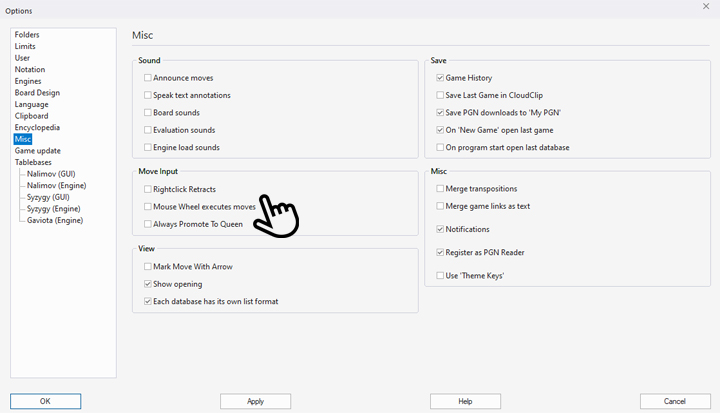
The "Move Input" area offers three options:
"Rightclick Retracts" = Retract Move: If this box is checked, you can undo the last move at any time while viewing or entering a game by right-clicking on it (it will not be deleted from the notation). You can continue doing this until you reach the starting position. If the checkbox is not selected, right-clicking will bring up this menu, which you can use to find references for the game in the Mega Database, in the repertoire or in the opening report, depending on what is installed on your computer and how it is configured:
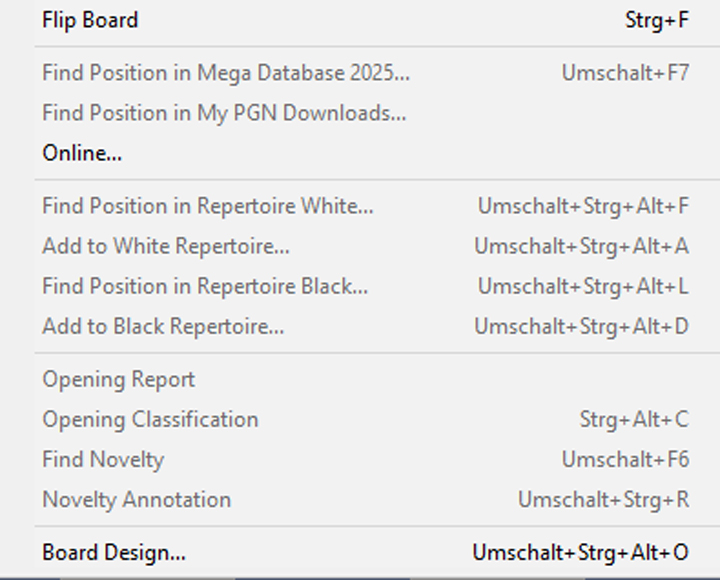
This menu normally opens with a right mouse click and offers many options, depending on the user's ChessBase configuration. However, the right mouse button can also be used in other ways, as described above.
If you rarely use the latter option, it is worth ticking the box to save the time you would otherwise need to undo moves manually.
If you decide against the above option, you can also undo moves using the mouse wheel. In this case, you can even "scroll" forwards and backwards in the game using the mouse wheel. To do this, tick the box (see first screenshot) next to "Mouse Wheel executes moves".
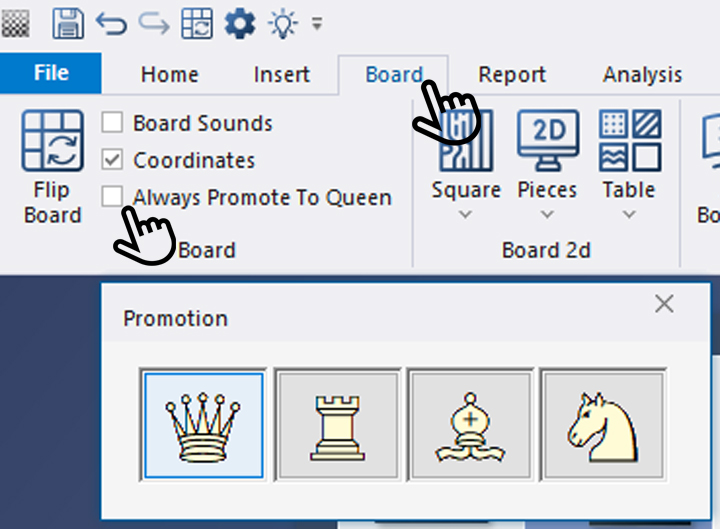
The third point should also be mentioned here. Although it has nothing directly to do with mouse operation, it often leads to questions: If the box next to "Always Promote To Queen" is checked (also found under the main menu item "Board"), pawns that reach the opponent's back rank are always promoted to queens. If the box is not checked, the following selection menu appears:
Now we hope you enjoy analysing your positions on your customised board design.
------
ChessBase has developed over decades to become what it is now in its 2026 version. The program has countless options, which we will present here in small portions – so you can design your interface for pleasant daily use and keep learning about new options and how to use them to get the most out of ChessBase´26 and save time.
We hope that this tip will help you to have more fun and be more successful when using ChessBase´26. You can find more tips and hints on our support pages and FAQ pages.
All parts of the series and more links:
In this powerful new course, endgame expert Karsten Müller teams up with rising star Leon Mendonca to deliver what truly matters: 10 essential rules that every player must know.
Endgames decide more games than any opening preparation ever will and yet they are often the least understood phase of chess. In this powerful new course, endgame expert Karsten Müller teams up with rising star Leon Mendonca to deliver what truly matters: 10 essential rules that every player must know.
Free Video sample: Introduction
Free Video sample: Activate the king




.jpeg)