


ChessBase´26 – Beginner's Tips, Part 13: Powerbooks and Powerbases

by Stefan Liebig
5/3/2026 – Would you like to make the most of ChessBase´26, especially in the opening, to improve your repertoire? With the Powerbooks and Powerbases, you will always be one step ahead of your opponents. Learn how to use these comprehensive and up-to-date databases with ChessBase and how to train your favourite openings with Fritz.

YOUR EASY ACCESS TO OPENING THEORY: Whether you want to build up a reliable and powerful opening repertoire or find new opening ideas for your existing repertoire, the Opening Encyclopaedia covers the entire opening theory on one product.
YOUR EASY ACCESS TO OPENING THEORY
Be well prepared with the new Opening Encyclopaedia 2026! Whether you want to build up a reliable and powerful opening repertoire or find new opening ideas for your existing repertoire, the Opening Encyclopaedia covers the entire opening theory on one product and is the ideal start for your opening training. Many new articles enrich the current theory with new or revisited ideas. The Encyclopaedia can help you learn openings quickly and give you a head start on your next opponent. Each article contains explanations and annotated games illustrating typical plans to deepen your understanding.

Difference between Powerbook and Powerbase

In addition to the complete Fritz Powerbook, ChessBase offers Powerbooks and Powerbases for many special openings. Although they sound similar, they are very different and, at only €9.90 each, are a real bargain:

  • A Powerbook is an extensive collection of opening moves. It contains the opening phases of a huge number of games, which can be accessed in a systematic manner. It provides the number of times a move has been played in a position, the probability of winning or drawing, as well as the average Elo rating and performance with the respective move. The Powerbook also contains a very large number of computer games, which explains the sometimes very high Elo ratings and performance values.
  • Each Powerbase contains around 10,000 games on a specific topic. The games are included in full and some are annotated. They represent a selection of the best historical and current players from the Mega and correspondence chess databases. 

This demonstrates the fundamental difference between the two products. Powerbooks can be used to systematically analyse openings or, as we will show later in this tutorial, to train with Fritz. Powerbases are ideal for understanding opening ideas and the typical positions that arise from them, using annotated top-level games.

Opening Powerbook and Powerbase

After installation, you can access Powerbook and Powerbase in ChessBase and Fritz as a "book" – one of the tabs in the notation window. Here is an example from the Fritz mask, which looks identical in ChessBase:
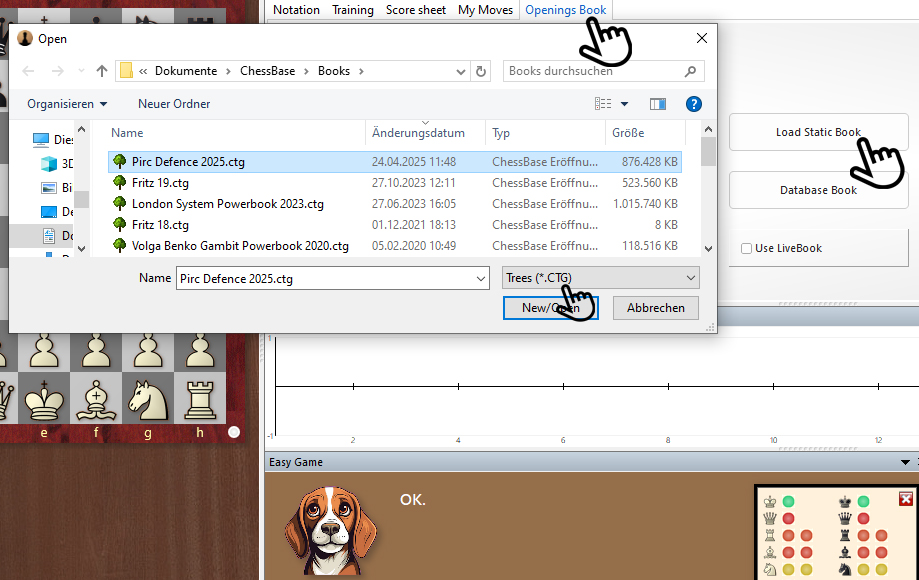
The index fingers (from top to bottom) indicate the clicks required to open a Powerbook: 1. Click on "Book" in the tabs of the notation window. 2. Click on "Open Book" in the Notation window. 3. Select the desired book in the window that opens; the selection is already preset to "Trees (*.CTG)".

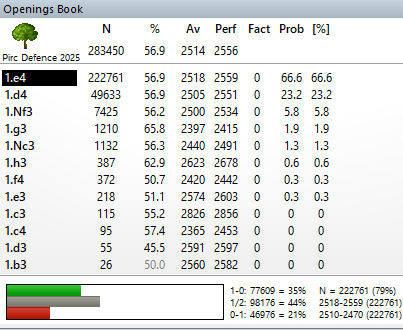
The Pirc Defence Powerbook 2025 consists for a greater part of engine games (168 000), to which has been added high value material from Mega and the Correspondence Database (115 000).
For the launch of the Pirc Powerbook 2025 a minimum rating of rating 2200 was set for computer games, 2000 for human games. 115 000 games from Mega and correspondence chess crossed this threshold, to which were added roughly 168 000 from the engine room of playchess.com, making a total of 283 000 games. The Pirc Defence is considered risky from Black’s point of view, because the centre is conceded to White. On the other hand, that creates for Black a chance, because just like, e.g., in the Grünfeld Defence he can attack the white centre. Thus the Pirc Defence is well suited to playing for a win with the black pieces.

For this example, we have chosen the latest Powerbook on the Pirc Defence. After opening, the following picture appears:
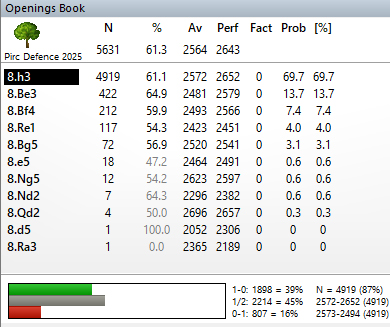
If we now click on the top move, which is the most frequently played move, we can see how the number of games (N) decreases. However, we can also see that after eight moves, there are still a large number of variations available:
After five more moves, we have the following picture:
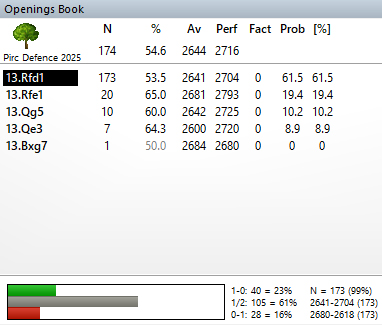
Here we see five remaining 13th moves by White. Both the number of games (N) and the Elo ratings (Av and Perf) indicate that 13.Rfd1 is a frequently played variation.

ChessBase or Fritz?

Here are two examples that show different ways of using Powerbooks in ChessBase and Fritz. 

Example ChessBase:
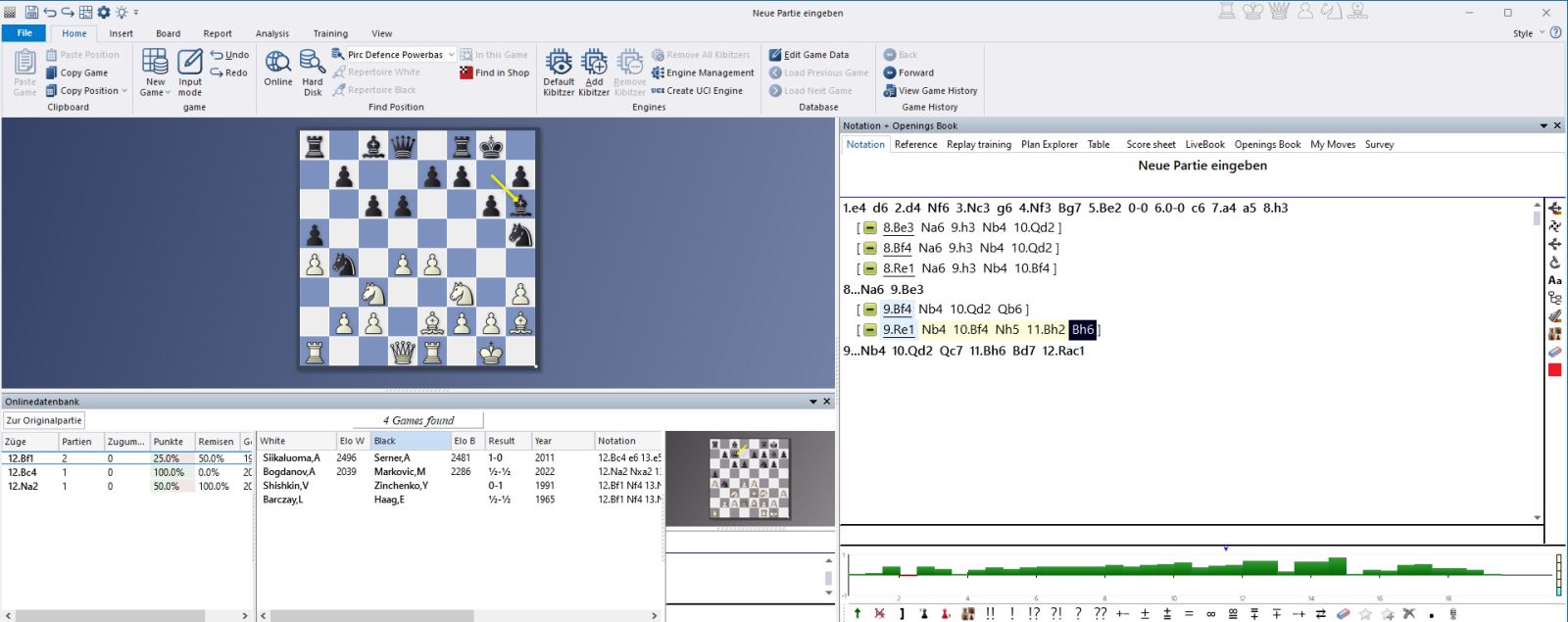
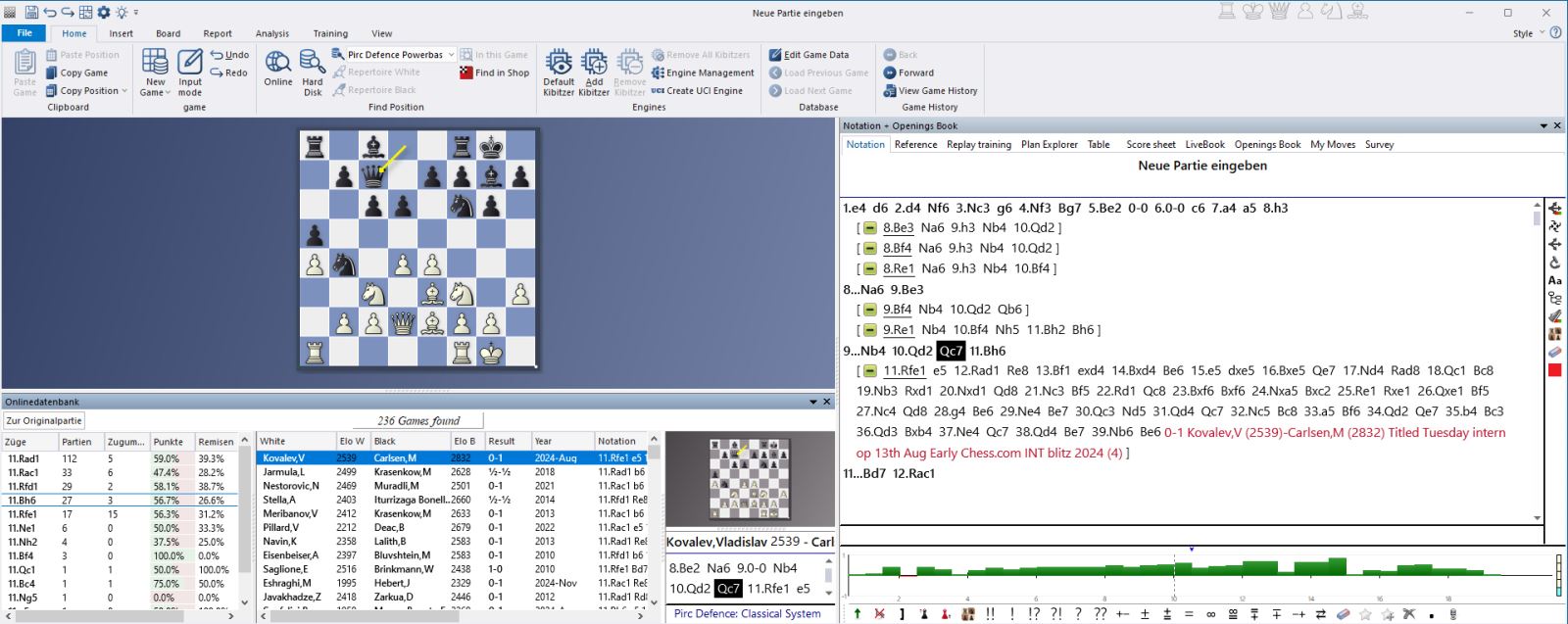
Lines have been added here by going back in the notation and selecting moves other than the most common ones. This allows you to build your own opening database. If you then add the Online or Megadatabase, as has been done here under the board, you will find suitable game material. This can of course also be inserted into the notation (right-click on the desired game and select "Copy to notation ..."):
Example Fritz:

This (next screenshot) is an example showing the board, book and notation. Choose whether you want to start from the starting position or a specific position, and whether you want to play White or Black. You can prompt Fritz to move by clicking "Move Now!" (see finger).

You can also start a completely new game against Fritz and the opening book with "New Game White" or "New Game Black", or examine the desired positions with "Infinite Analysis".
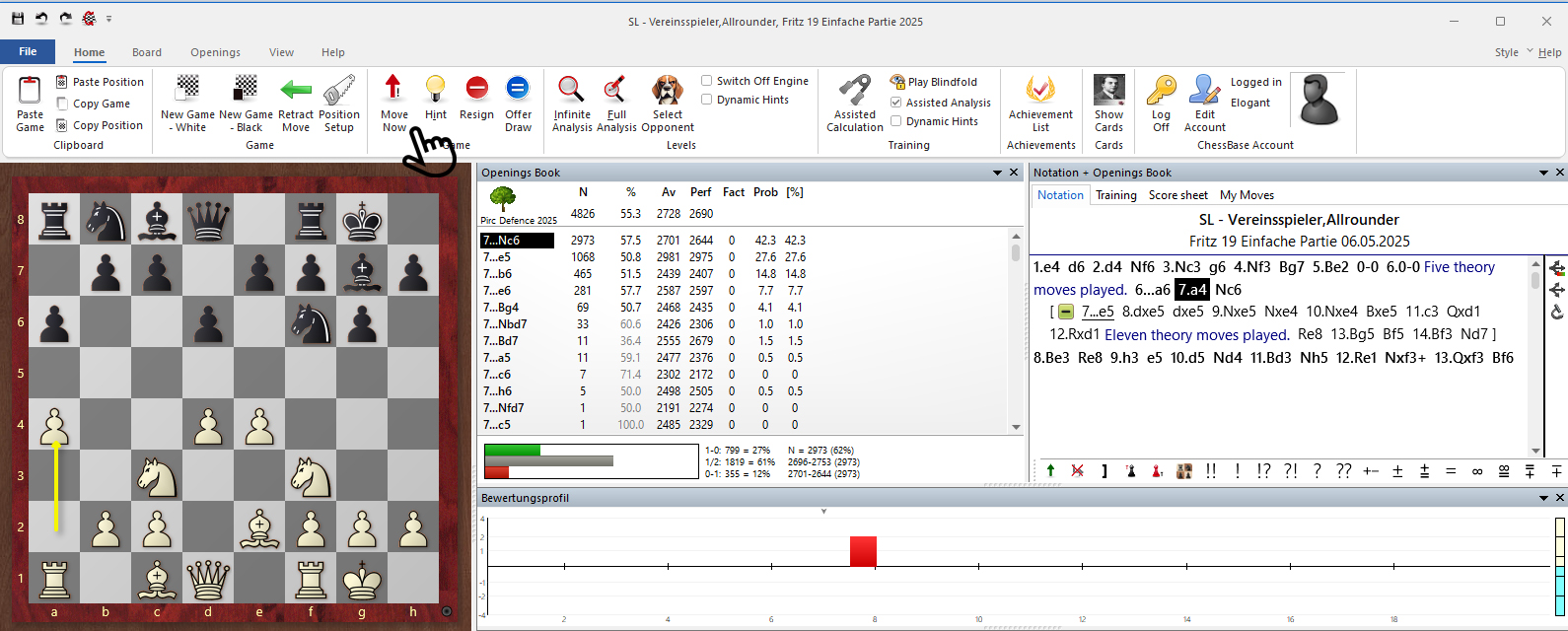
In all cases, Fritz will select variations from the tree, and you can decide how much you want to think for yourself or look at the moves in the tree. In any case, you will get a good overview of the variations.

Pirc Defence Powerbase 2025 is a database and contains a total of 10027 games from Mega 2025 or the Correspondence Database 2024; of these 874 are annotated.
The 874 selected annotated games offer outstanding material for study. Players such as Adhiban (2 annotated games), Kramnik (2), Gashimov (1), Karjakin (1) and Gelfand (4) have contributed analyses, but the lion’s share of the annotated games is down to Pirc experts Igor Stohl (145), Alexander Finkel (92) and Sergey Erenburg. There is a total of 10027 games in which the rating average is at least 2570.

You can open the Powerbase in the same way as the Powerbook. However, working with ChessBase is more useful here and corresponds to the databases we have already introduced in previous episodes.

2.5 million games
The new Corr Database 2026 is the large ChessBase collection of correspondence games from the period from 1804 to 2025. With more than 80,000 tournaments and over 2.5 million correspondence games, the Corr 2026 is a must for all Correspondence chess fans.

As always, we hope you enjoy trying out and discovering the many great features of ChessBase 18! With Powerbook and Powerbase, you have a huge knowledge advantage over players who do not use these resources. If you systematically exploit this advantage and continue to develop your working methods, you will quickly see the results... 

The London System Powerbook 2026 is based on more than 410 000 games or game fragments from different opening moves and ECO codes; what they all have in common is that White plays d4 and Bf4 but does not play c4.
This way of starting the game has long since shed its image as an opening for amateurs, world class players like So, Kramnik, Grischuk, Vachier-Lagrave, Aronian and Karjakin play the opening with both colours, and included in the basis for the London Book there are also 254 games by Magnus Carlsen. In order to guarantee a high degree of reliability in the statistics a threshold for the acceptance of games and parts of games was set at 2300. Thus the Powerbook is based on 350 000 engine games and also 62 000 games from Mega 2026 + Correspondence Database 2026.

London System Powerbase 2026 is a database and contains in all 11 285 games from Mega 2026 and the Correspondence Database 2026, of which 282 are annotated.
The database contains a total of 11285 games where the average rating of the players is at least 2570 (apart from annotated games and games played by specialists). Among the annotators there are some world-famous names such as Adhiban, Anand, Duda, Edouard, Firouzja, Giri, Grandelius, Kasimdzhanov, Meier, Nielsen, Nihal and more.

------

ChessBase has developed over decades to become what it is now in its 2026 version. The program has countless options, which we will present here in small portions – so you can design your interface for pleasant daily use and keep learning about new options and how to use them to get the most out of ChessBase´26 and save time. 

We hope that this tip will help you to have more fun and be more successful when using ChessBase´26. You can find more tips and hints on our support pages and FAQ pages.

All parts of the series and more links:


Stefan Liebig, born in 1974, is a journalist and co-owner of a marketing agency. He now lives in Barterode near Göttingen. At the age of five, strange pieces on his neighbour’s shelf aroused his curiosity. Since then, the game of chess has cast a spell over him. Flying high in the NRW youth league with his home club SV Bad Laasphe and several appearances in the second division team of Tempo Göttingen were highlights for the former youth South Westphalia champion.
Discussion and Feedback Submit your feedback to the editors