View

This tutorial focuses on the often-overlooked "View" menu. You can use it not only in the main window to customize your ChessBase´26 interface but also in many other areas of the program, which we’ll explore further below.
Pro Tip
Before we begin, an important note: all the features presented here are best understood in combination with our earlier tutorials, Beginner Tips Part 10: Standard Layouts or Custom Layout? and Beginner Tips Part 11: Multitasking with Multiple Windows. These guides show you how to format and arrange layouts and windows to suit your preferences. When used together, they give you the perfect tools to create a workspace that feels comfortable and puts everything exactly where you need it during analysis.
The View Menu in the Main Interface of ChessBase´26
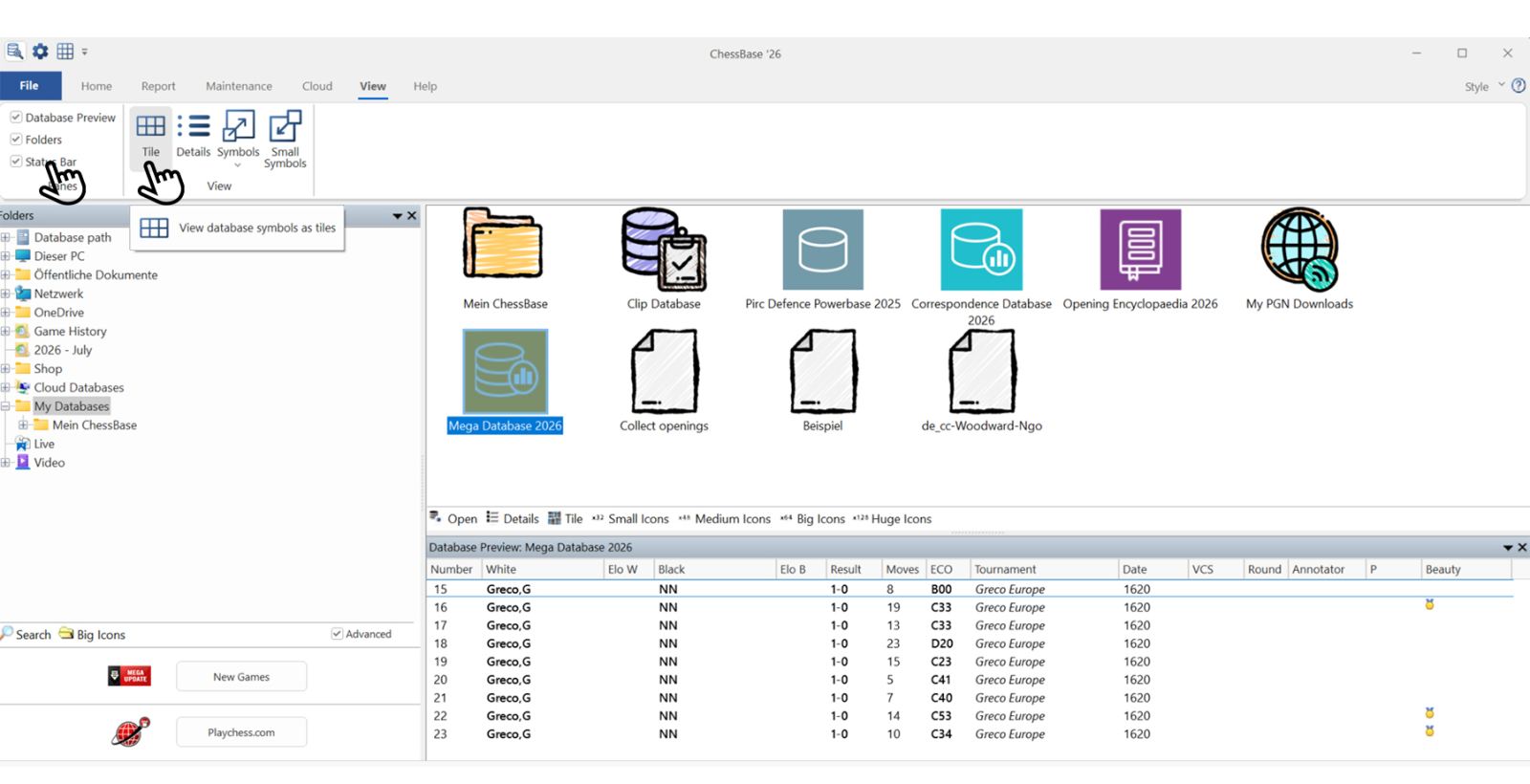
The first hand in the screenshot above — which shows the View menu already open — points to the three options that are currently checked. As a result, the large window in the lower right displays the direct list, meaning it shows the games from the database selected in the window above (in this case, Mega Database 2026).
We already mentioned the Folders option in connection with the game updates. It gives you an overview of your folders, including links to game updates and to Playchess.com. The Status Bar is the blue strip at the very bottom, showing the most recent action performed.
The second hand points to the different display modes for the files in the main window — in this example, the selected folder on the left is "My Databases." The view changes depending on the display option you select (in the screenshot, "Tile" is active):
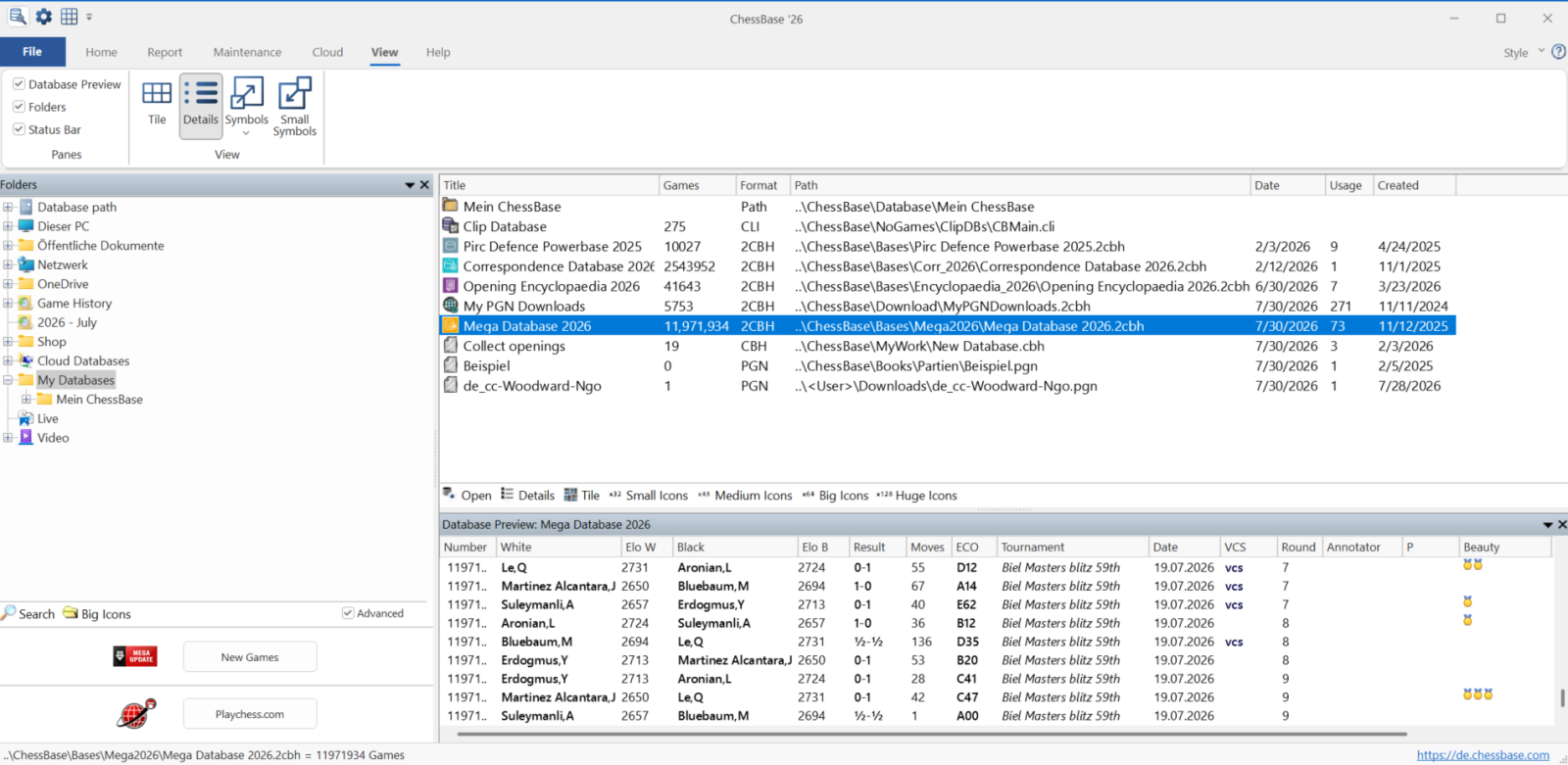
Details
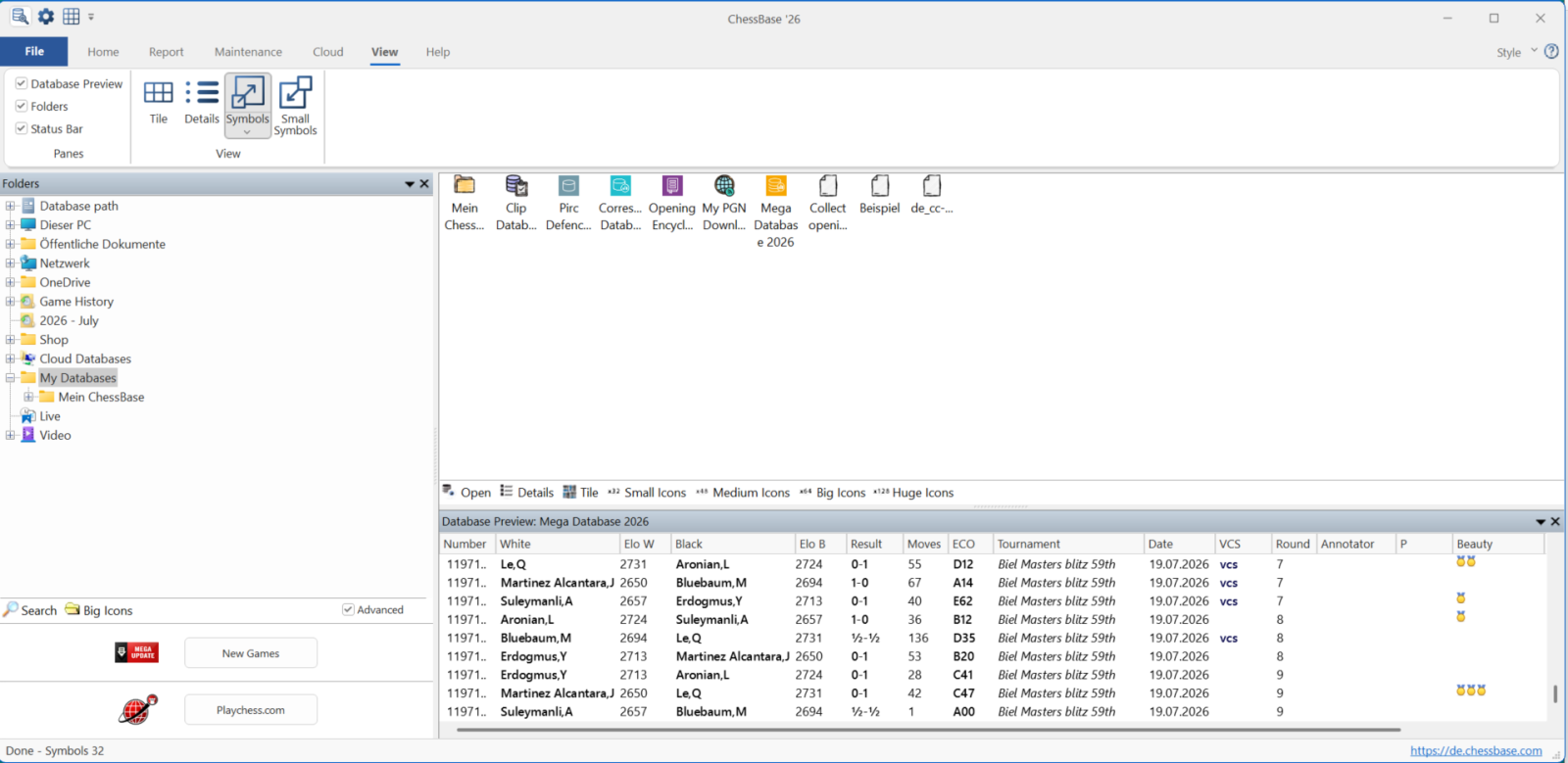
Symbols
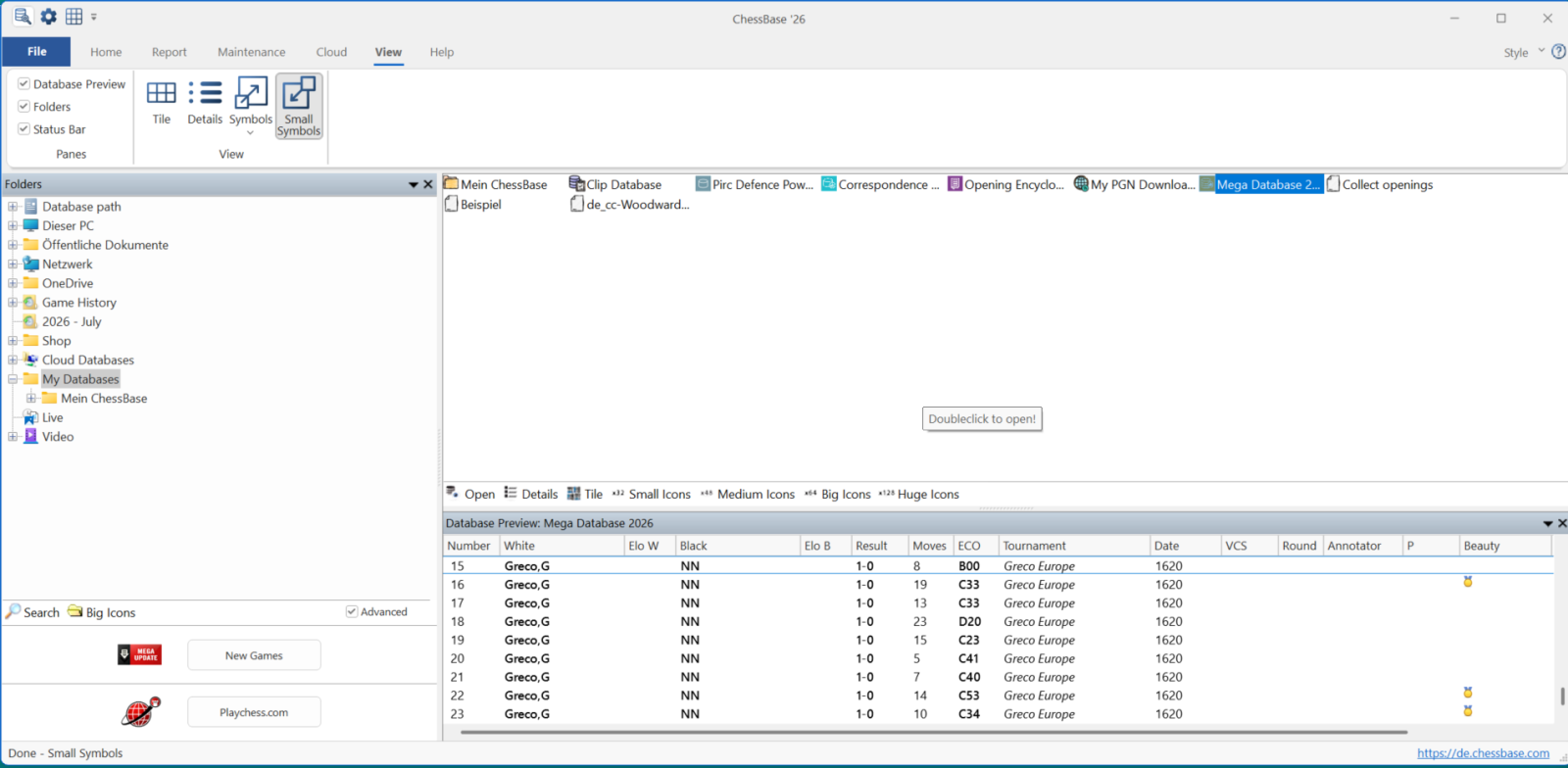
Small Symbols
The Details view has the advantage of showing key information about each file at a glance.
EXPAND YOUR CHESS HORIZONS
Data, plans, practice – the new Opening Report In ChessBase there are always attempts to show the typical plans of an opening variation. In the age of engines, chess is much more concrete than previously thought. But amateurs in particular love openings with clear plans, see the London System. In ChessBase ’26, three functions deal with the display of plans. The new opening report examines which piece moves or pawn advances are significant for each important variation. In the reference search you can now see on the board where the pieces usually go. If you start the new Monte Carlo analysis, the board also shows the most common figure paths.
View Menu in the Notation Window
When you open the notation window — in this example, we simply clicked on the first game in the Details view from the second screenshot above — and then activate the View tab, you'll see the following layout if none of the options are checked:
 YOUR EASY ACCESS TO OPENING THEORY: Whether you want to build up a reliable and powerful opening repertoire or find new opening ideas for your existing repertoire, the Opening Encyclopaedia covers the entire opening theory on one product.
YOUR EASY ACCESS TO OPENING THEORY
Be well prepared with the new Opening Encyclopaedia 2026! Whether you want to build up a reliable and powerful opening repertoire or find new opening ideas for your existing repertoire, the Opening Encyclopaedia covers the entire opening theory on one product and is the ideal start for your opening training. Many new articles enrich the current theory with new or revisited ideas. The Encyclopaedia can help you learn openings quickly and give you a head start on your next opponent. Each article contains explanations and annotated games illustrating typical plans to deepen your understanding.
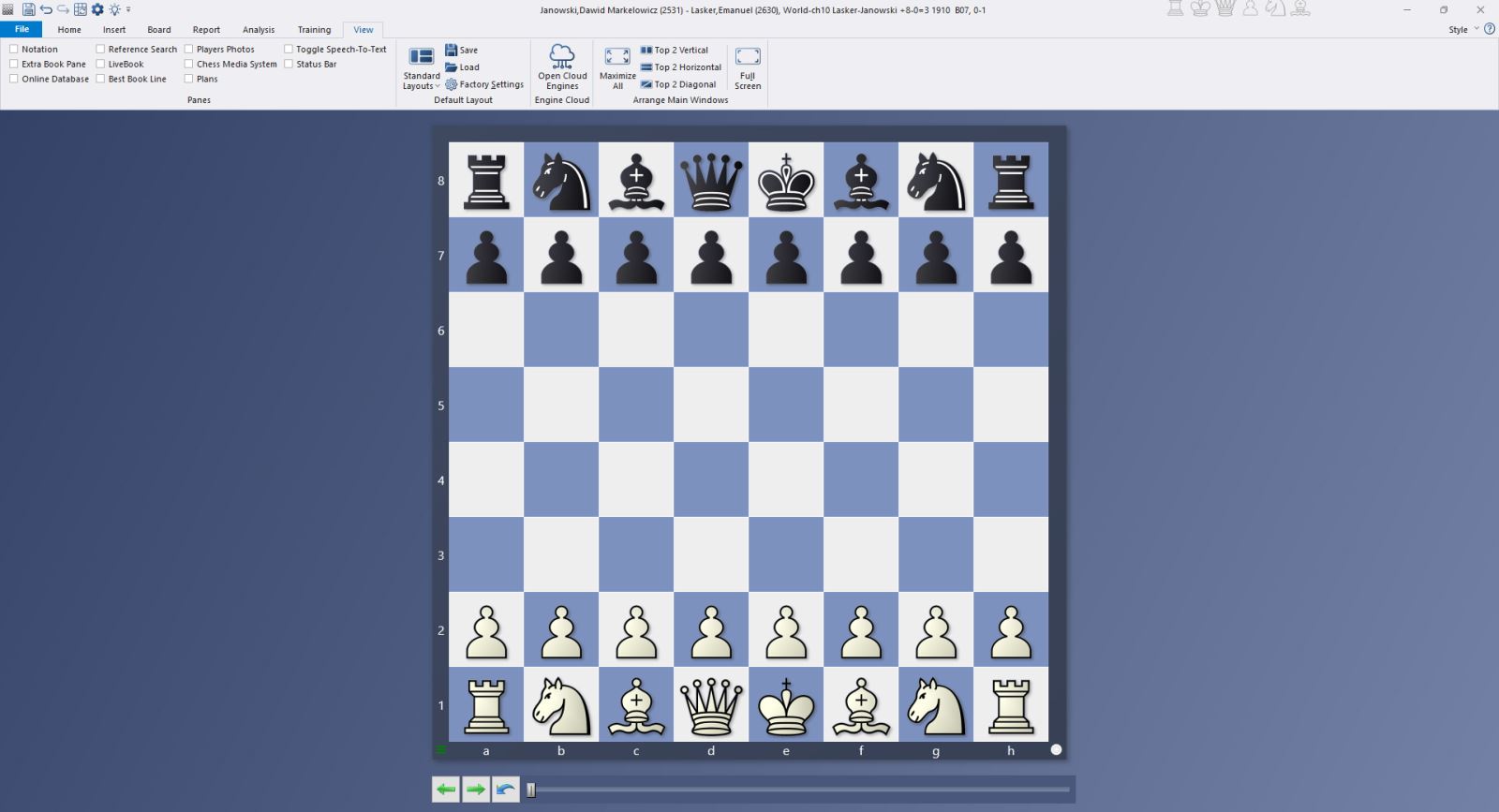
Now go ahead and try checking some of the options in the top left to see what happens — here’s another example:

But be careful: things can quickly become confusing if you select too many options...

Whenever that happens, just take a moment to consider what’s important to you, and use Tutorials 10 and 11 to create your own custom layout.
Learn from legends! Get the full Master Class series on the World Champions at a discounted bundle price.
Learn from legends! Get the full Master Class series on the World Champions at a discounted bundle price – only for a limited time.
View Menu in Other Windows
(Example: MegaDatabase 2026)
No matter which database you're working with, you can apply the same principles shown above and customize everything to suit your preferences.
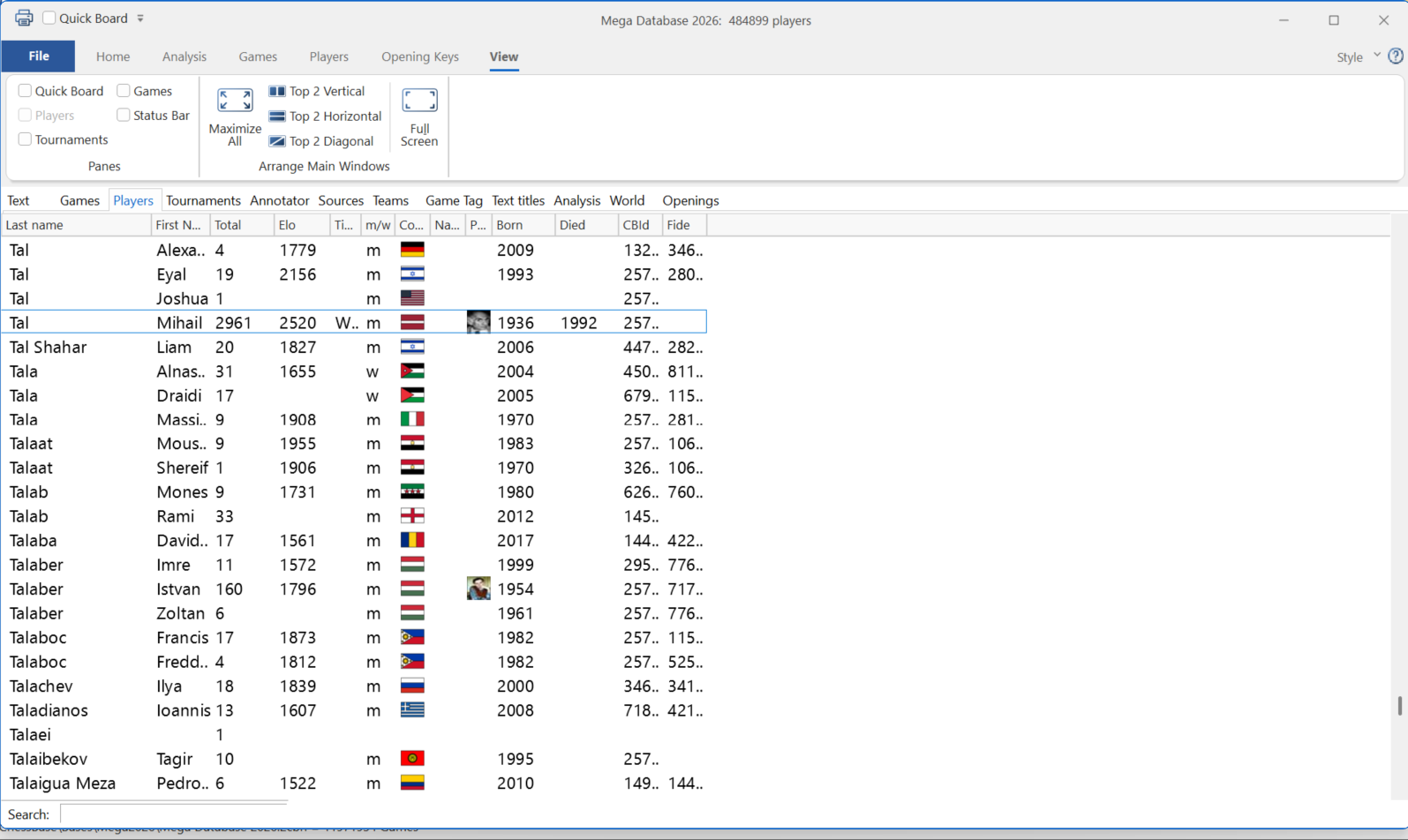
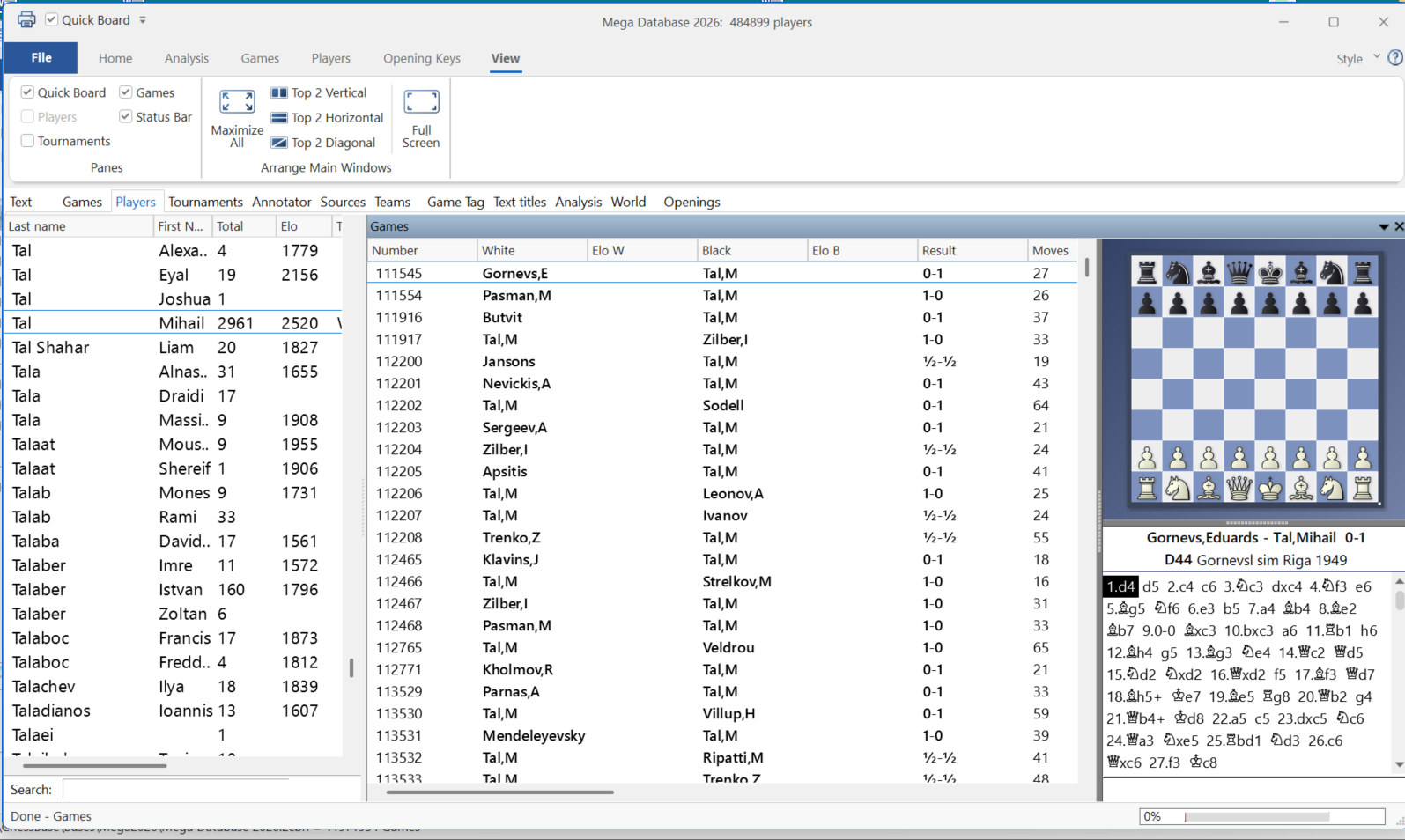
In this example, we’ll demonstrate using the games of Mikhail Tal in the current MegaDatabase.
First, here’s the "raw version" with no options checked in the top left:
Now with some selected options:
The premiere chess database with over 11.7 million games
The ChessBase Mega Database 2026 is the premiere chess database with over 11.7 million games from 1475 to 2025 in high quality.
And now, we hope you enjoy working with the custom layouts you've created in ChessBase´26.
------
ChessBase has developed over decades to become what it is now in its 2026 version. The program has countless options, which we will present here in small portions – so you can design your interface for pleasant daily use and keep learning about new options and how to use them to get the most out of ChessBase´26 and save time.
We hope that this tip will help you to have more fun and be more successful when using ChessBase´26. You can find more tips and hints on our support pages and FAQ pages.
All parts of the series and more links:
Learn from legends! Get the full Master Class series on the World Champions at a discounted bundle price.
Learn from legends! Get the full Master Class series on the World Champions at a discounted bundle price – only for a limited time.
- Beginner´s Tips Part 1: Entering and Saving Your Own Games
- Beginner´s Tips Part 2: Insert variations and add engines
- Beginner´s Tips Part 3: Insert variations from references and engines
- Beginner´s Tips Part 4: Figurines and Colours
- Beginner´s Tips Part 5: Annotations
- Beginner´s Tips Part 6: Quick access toolbars and variation hierarchies
- Beginner´s Tips Part 7: Organising databases!
- Beginner´s Tips Part 8: Together what belongs together...!
- Beginner´s Tips Part 9: Tactical Analysis
- Beginner´s Tips Part 10: Standard Layout or Custom Layout
- Beginner's Tips, Part 11: Multitasking with several windows
- Beginner's Tips, Part 12: Arrows and marks
- Beginner's Tips, Part 13: Powerbooks and Powerbases
- Beginner's Tips, Part 14: Save resources with remote engines
- Beginner's Tips, Part 15: Setting up and analysing positions
- Beginner's Tips, Part 16: Setting up and analysing positions (Part 2)
- Beginner's Tips, Part 17: Choosing your board design
- Beginner's Tips, Part 18: What the mouse can do!
- Beginner's Tips, Part 19: Find model games for training
- Beginner's Tips, Part 20: Award medals to your best games!
- Beginner's Tips, Part 21: Maximum Training Effect with the Power Tool "Replay Training" (Part 1)
- Beginner's Tips, Part 22: Maximum training effect with the ‘Replay Training’ power tool (Part 2)
- Beginner's Tips, Part 23: Stay up to date with program updates
- Beginner's Tips, Part 24: Always get the latest games via update
- ChessBase´26: A Players Guide (1)
- ChessBase´26: A Players Guide (2)
- ChessBase´26: A Players Guide (3)
- ChessBase´26: A Players Guide (4)
- ChessBase´26: A Players Guide (5)
- Videos:
Matthias Wuellenweber on all new functions for ChessBase 26
ChessBase 26 - The interview with Matthias Wuellenweber
Matthias Wuellenweber - The Complete Guide to the ChessBase 26 Opening Report
Matthias Wuellenweber - The Complete Guide to the ChessBase 26 Monte-Carlo-Analysis
Dorian Rogozenco: How a GM uses the new ChessBase 26 opening report
Dorian Rogozenco: How a Grandmaster Uses the New ChessBase´26 Monte-Carlo Analysis




.jpeg)