Imagine yourself sitting at the board – in the middle of a grandmaster game. Impossible?! No, because that's exactly what Replay Training in ChessBase´26 allows you to do.
In replay mode, you are not just a spectator, but an active part of the game: your decision is required for every move. Did you identify the right plan? Was your move strong enough—or was there a better option? The program gives you immediate feedback and transforms every game into an intensive, interactive training experience that noticeably deepens your understanding of chess.
As in the last two tutorial articles on awarding medals and getting started with replay training, we open the game Tal vs. Smyslov from the 1959 Candidates Tournament for illustration purposes. You can watch the entire game in the replayer:
Learn from legends! Get the full Master Class series on the World Champions at a discounted bundle price.
Learn from legends! Get the full Master Class series on the World Champions at a discounted bundle price – only for a limited time.
In the last article, we explained how to start the replay training mode in the notation window of ChessBase´26, how to use the basic functions, and how to get the most out of the training effect. In this article, we explain which additional functions you can use and how to do so.
Use the replay training tools!
Lifebuoy
We've already explained that the radar board shows the game after three more moves. This is also given as a text hint, and tips appear automatically after the opening phase. However, if you're having trouble figuring out the right opening moves to reach the position on the radar board, you can get help:
Simply click on the lifebuoy icon. And don't worry: This little help won't cost you any points!
In our example game, clicking on the lifebuoy on the fifth move would result in the following tip:
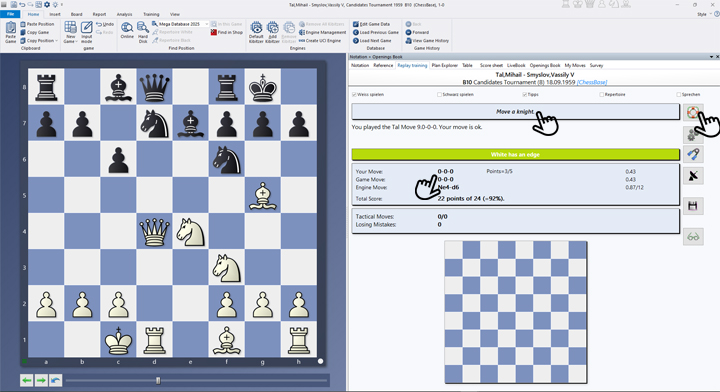
- In the screenshot, the right hand shows the lifebuoy that needs to be clicked for a tip.
-
After clicking, the tips will appear in the top centre—there may be several. It is therefore worth clicking several times. Even if you are inactive for a while, another tip will appear.
-
Below this, the move list is displayed, showing your own move, the game move and the engine move, which differs from the game move in this case.
The premiere chess database with over 11.7 million games
The ChessBase Mega Database 2026 is the premiere chess database with over 11.7 million games from 1475 to 2025 in high quality.
Gears = “Manual Analysis”
The gear tool is also a handy tool. Click here to pause the replay training. You can now analyse the position—but without ChessBase´26 support. If you click the icon again, you'll return to the position where you previously clicked on the gears.
Hand muscle trainer = ‘Assisted calculation’
This tool also interrupts the actual replay training. Now you can analyse the position blindly. To do this, simply execute the moves you want to analyse. To check, you can display the position reached at any time by right-clicking. You can return to the replay training by clicking on the sports equipment again.
Radar board
You're already familiar with the radar board. Click on the icon to activate and deactivate it.
Diskette
Saves the current position. This allows you to retain the original game and analyse it in your own version or continue the analysis at a later time.
Glasses
By clicking on the glasses, you can go through the game move by move and see the comments displayed for each move.

Talk
If you check the “Talk” box directly above the lifebuoy, the tips will be announced to you.
End of game
When the end of the game is reached, you will see the following view in the tip area:

The free app from ChessBase! ChessBase Mobile has everything you need as a chess player on the go:
access your chess data in cloud databases - and 13 million games.
ChessBase Mobile has everything you need as a chess player on the go:
- Access the ChessBase online database - with more than 13 million games: search for players, positions, openings etc.
- Save your own games and analyses in cloud databases
- Synchronise your personal databases across all your devices
- Analyse your games with the built-in engine
- Live opening book: use the most comprehensive and up-to-date statistics for every opening position
- Access your opening repertoire in the cloud: create and edit your personal opening repertoire
- 300 opening overviews, with repertoire suggestions: get started with new systems!
- Practise opening variations with three modes.
- Advanced notation: add comments, symbols, variations, arrows and markings to your games
- Advanced sharing options: share games and positions via link, image, GIF, FEN or QR code
- PGN compatibility: upload and download games or databases as PGN files
Pro tips
- Combine the various tools and find the best practical approach for you. With a little practice, replay training can also be used excellently for training work in clubs.
- You can use the cursor keys to move back and forth in the game as you wish. With the frequently mentioned shortcut CTRL+Z, you can switch from your analysis back to the original game (you may want to save first).
- We'll explain the "Repertoire" option in more detail in a later tutorial. If you'd like to experiment with it, you can do so as follows:
Open a new board with Ctrl+N > Training > Standard Repertoires > Select an existing repertoire > In the "My Moves" tab, use Ctrl+C and Ctrl+V to copy the notation to the Notation tab > Only then click the "Replay Training" tab and check the "Repertoire" box.
Conclusion
If you want to improve your chess in a targeted manner and not just passively consume it, the replay training in ChessBase´26 is exactly the right tool for you. It turns every game into an active experience, challenging you to make your own decisions – with direct feedback and completely risk-free. The training is flexible, motivating, and enormously effective: You'll sharpen your positional feel, recognize typical motifs more quickly, and develop a deeper strategic understanding. Whether you're a beginner or an ambitious club player – this tool will help you progress noticeably and is also a lot of fun.
We hope you enjoy this great tool for interactive training.
------
ChessBase has developed over decades to become what it is now in its 2026 version. The program has countless options, which we will present here in small portions – so you can design your interface for pleasant daily use and keep learning about new options and how to use them to get the most out of ChessBase´26 and save time.
We hope that this tip will help you to have more fun and be more successful when using ChessBase´26. You can find more tips and hints on our support pages and FAQ pages.
All parts of the series and more links:
 Top trainers strongly recommend regular study of well-explained classical games to improve your understanding of chess in the long term. 33 modern classics are explained in details on this video course.
- Beginner´s Tips Part 1: Entering and Saving Your Own Games
- Beginner´s Tips Part 2: Insert variations and add engines
- Beginner´s Tips Part 3: Insert variations from references and engines
- Beginner´s Tips Part 4: Figurines and Colours
- Beginner´s Tips Part 5: Annotations
- Beginner´s Tips Part 6: Quick access toolbars and variation hierarchies
- Beginner´s Tips Part 7: Organising databases!
- Beginner´s Tips Part 8: Together what belongs together...!
- Beginner´s Tips Part 9: Tactical Analysis
- Beginner´s Tips Part 10: Standard Layout or Custom Layout
- Beginner's Tips, Part 11: Multitasking with several windows
- Beginner's Tips, Part 12: Arrows and marks
- Beginner's Tips, Part 13: Powerbooks and Powerbases
- Beginner's Tips, Part 14: Save resources with remote engines
- Beginner's Tips, Part 15: Setting up and analysing positions
- Beginner's Tips, Part 16: Setting up and analysing positions (Part 2)
- Beginner's Tips, Part 17: Choosing your board design
- Beginner's Tips, Part 18: What the mouse can do!
- Beginner's Tips, Part 19: Find model games for training
- Beginner's Tips, Part 20: Award medals to your best games!
- Beginner's Tips, Part 21: Maximum Training Effect with the Power Tool "Replay Training" (Part 1)
- ChessBase´26: A Players Guide (1)
- ChessBase´26: A Players Guide (2)
- ChessBase´26: A Players Guide (3)
- ChessBase´26: A Players Guide (4)
- ChessBase´26: A Players Guide (5)
- Videos:
Matthias Wuellenweber on all new functions for ChessBase 26
ChessBase 26 - The interview with Matthias Wuellenweber
Matthias Wuellenweber - The Complete Guide to the ChessBase 26 Opening Report
Matthias Wuellenweber - The Complete Guide to the ChessBase 26 Monte-Carlo-Analysis
Dorian Rogozenco: How a GM uses the new ChessBase 26 opening report
Dorian Rogozenco: How a Grandmaster Uses the New ChessBase 26 Monte-Carlo Analysis
As the author explains in the introductory video, knowing the classic games from the past enriches your chess understanding in general, and helps to improve the level of your own games.




.jpeg)