Strictly speaking, when working with ChessBase´26, you never need to leave the main ChessBase window. Within the interface, you can access all storage locations for your files, as well as view items you have purchased in the Shop. In this episode, we show you how this works:
Activating the "Folders" window
The basic requirement for using ChessBase´26 in this convenient way is that the "Folders" window is open. To do this, simply click on the main menu item View and check the box Folders (in tutorial parts 23, 24, and 25 we have already explained some other functions and display options, such as the two additional options shown above — "Database Preview" and "Status Bar" — as well as the update functions arranged below).
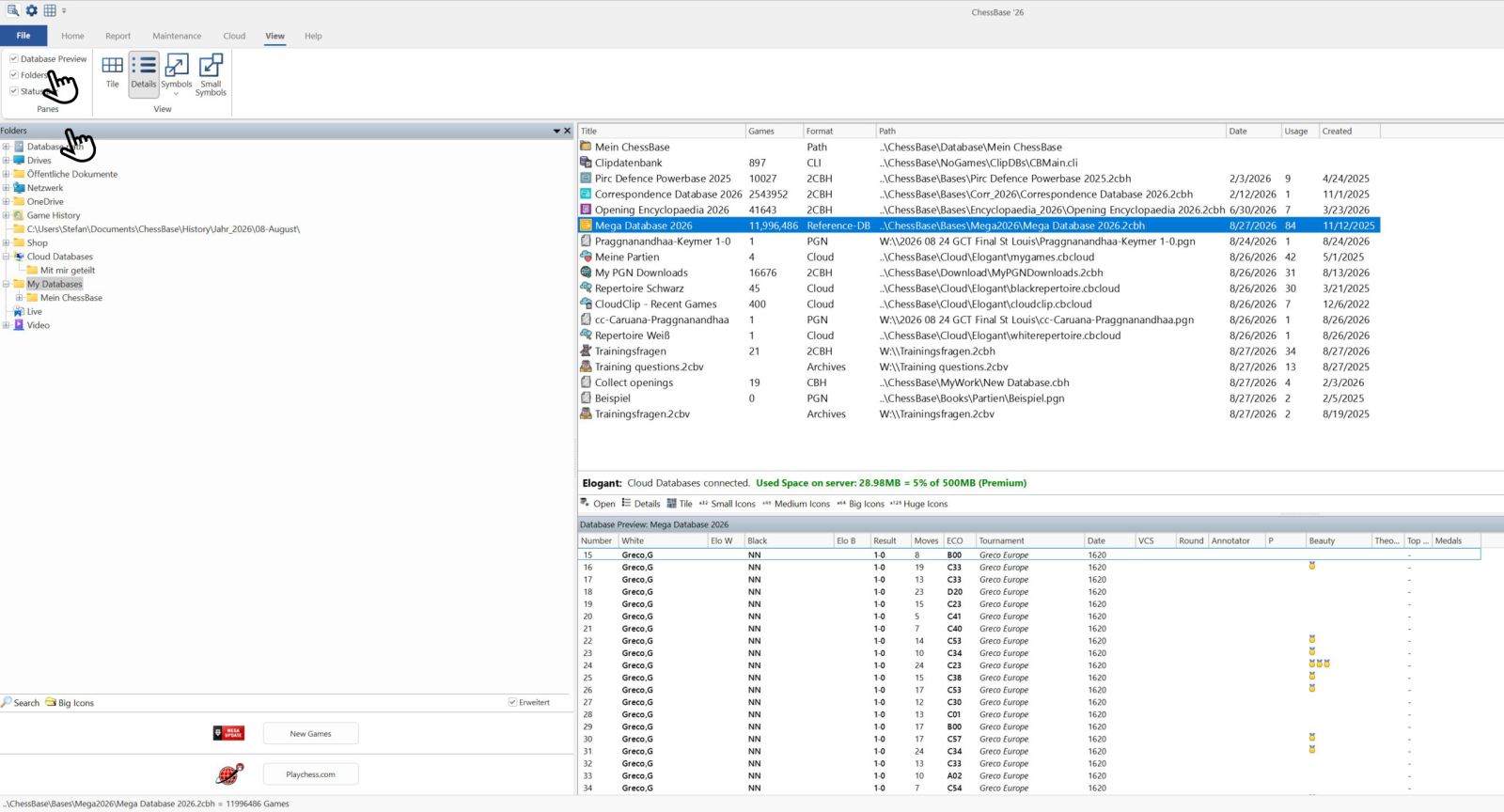
In this view there are two areas that we will explain in this episode: the upper part with the directory structure, and the lower part with the fields Search, Large, and Advanced.
Directory tree
Let us first take a look at the directory tree when the Advanced box is not checked:
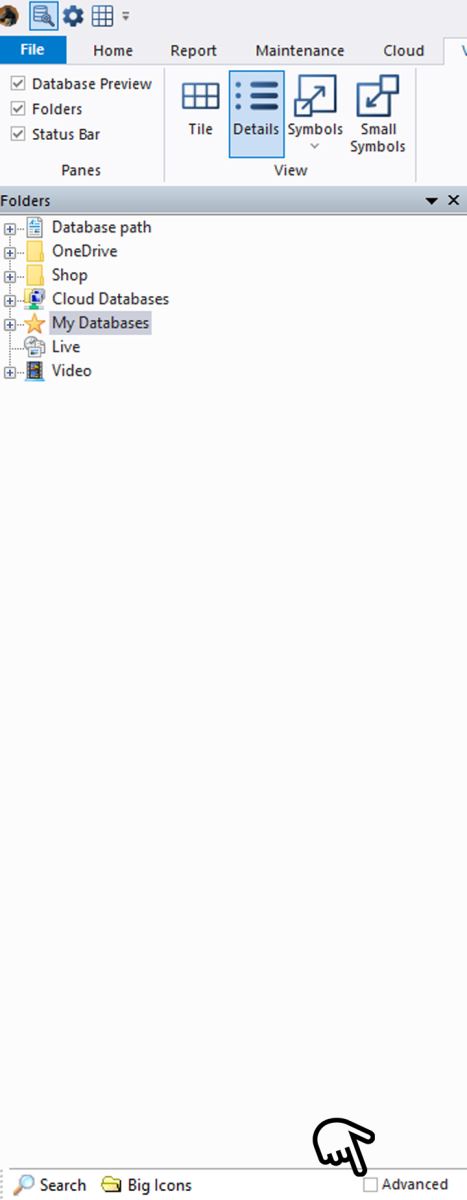
You will see the main directories of your ChessBase version.
If the Advanced field is not visible, you will need to widen the window.
You can now click on as many plus signs as you like to display subfolders:
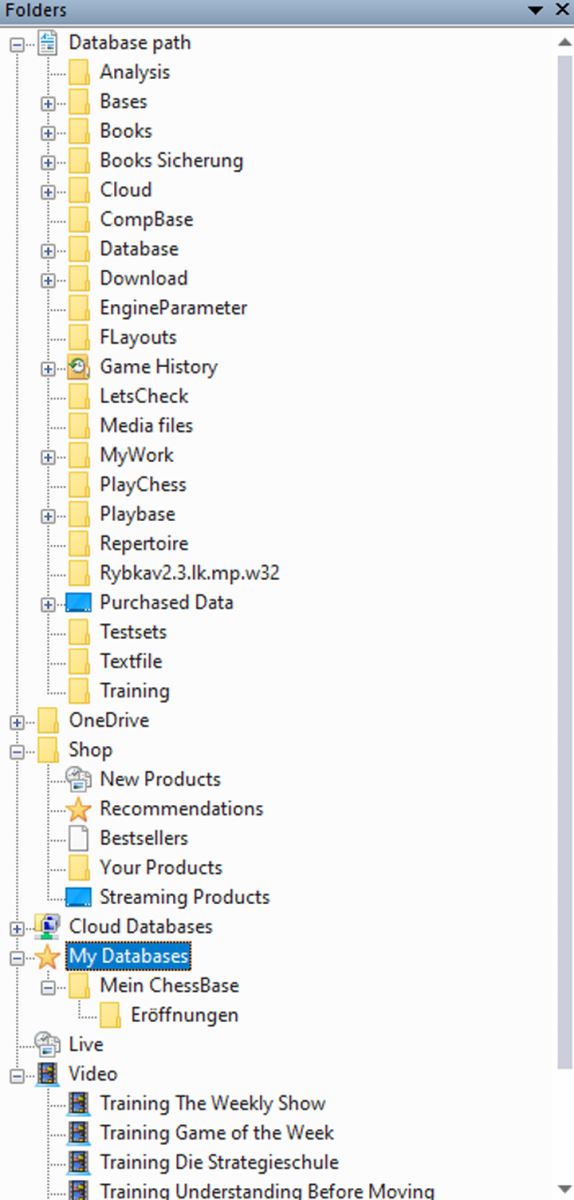
We can see here that the long "Database Path" window is expanded, showing a wide range of options. For example, under Books and Bases you will find the stored opening books (Books = .ctg files) and the installed products (Bases such as the Mega Database 2025):

Note on storage locations:
Where an installed product is located depends on the product. Installed products may be found under Bases (Mega/ Corr/ Opening Encyclopedia/ PowerBook databases – each in their own subdirectory).
Video courses, on the other hand, are by default located under C:\Users[Name]\Documents\ChessBase\Shop.
Ultimately, however, the user can decide where everything should be stored by deviating from the standard installation.
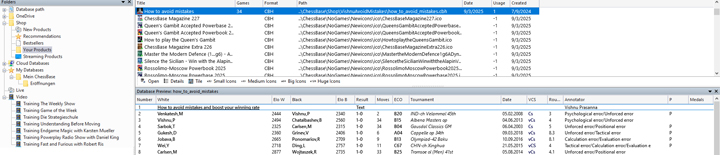
You can also see in the directory folder that you can browse the Shop there. For example, you will find new products or those you have already purchased, which you can then open directly with a double-click. In the direct list you can also see what to expect in the course, and you can open this content as a database as well:
The same applies to the "Video" window, where you can access the ChessBase video shows by Karsten Müller, Daniel King, or Harald Schneider-Zinner (the download may take a few minutes):
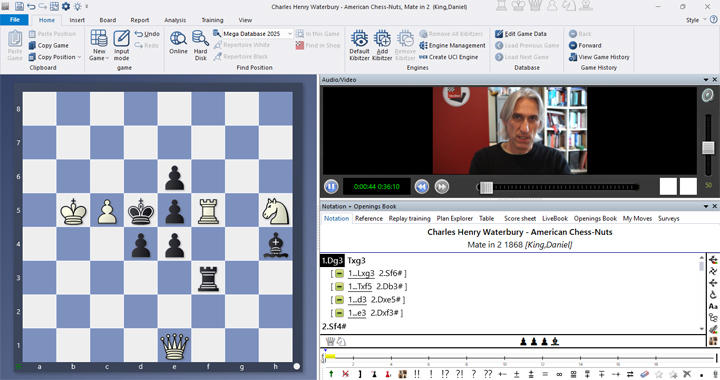
Through the "Live" window you can also view the data from the ChessBase live coverage on the homepage. Here is an example:

EXPAND YOUR CHESS HORIZONS
Data, plans, practice – the new Opening Report In ChessBase there are always attempts to show the typical plans of an opening variation. In the age of engines, chess is much more concrete than previously thought. But amateurs in particular love openings with clear plans, see the London System. In ChessBase ’26, three functions deal with the display of plans. The new opening report examines which piece moves or pawn advances are significant for each important variation. In the reference search you can now see on the board where the pieces usually go. If you start the new Monte Carlo analysis, the board also shows the most common figure paths.
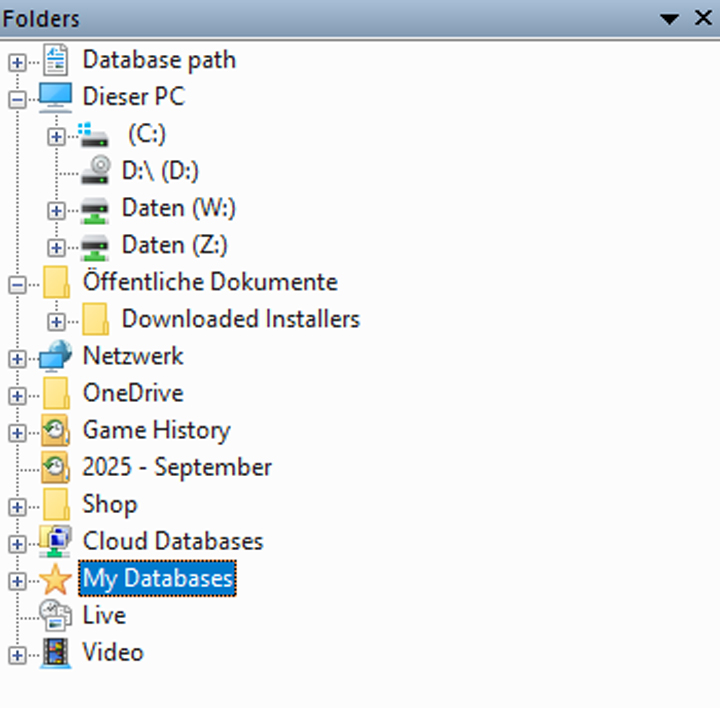
When the "Advanced" box is checked, you also gain access to your Windows Explorer directories – shown here already partially expanded: everything visible between "Database Path" and "OneDrive" is now also available for access:
EXPAND YOUR CHESS HORIZONS
ChessBase 26 + Fritz 21: The Summer Special Power Bundle
Study like a champion. Play like a legend.
Real progress happens in two places: at the desk, where you prepare and analyze, and at the board, where you test yourself under fire. For one week only, we are bringing both ChessBase flagships together in a single bundle so you can close the gap between the two. Prepare with ChessBase 26. Play against Fritz 21. Improve faster than either program can take you on its own.
Search
Suppose you want to search for games of certain players from your databases – you can do this very easily and quickly using the search function.
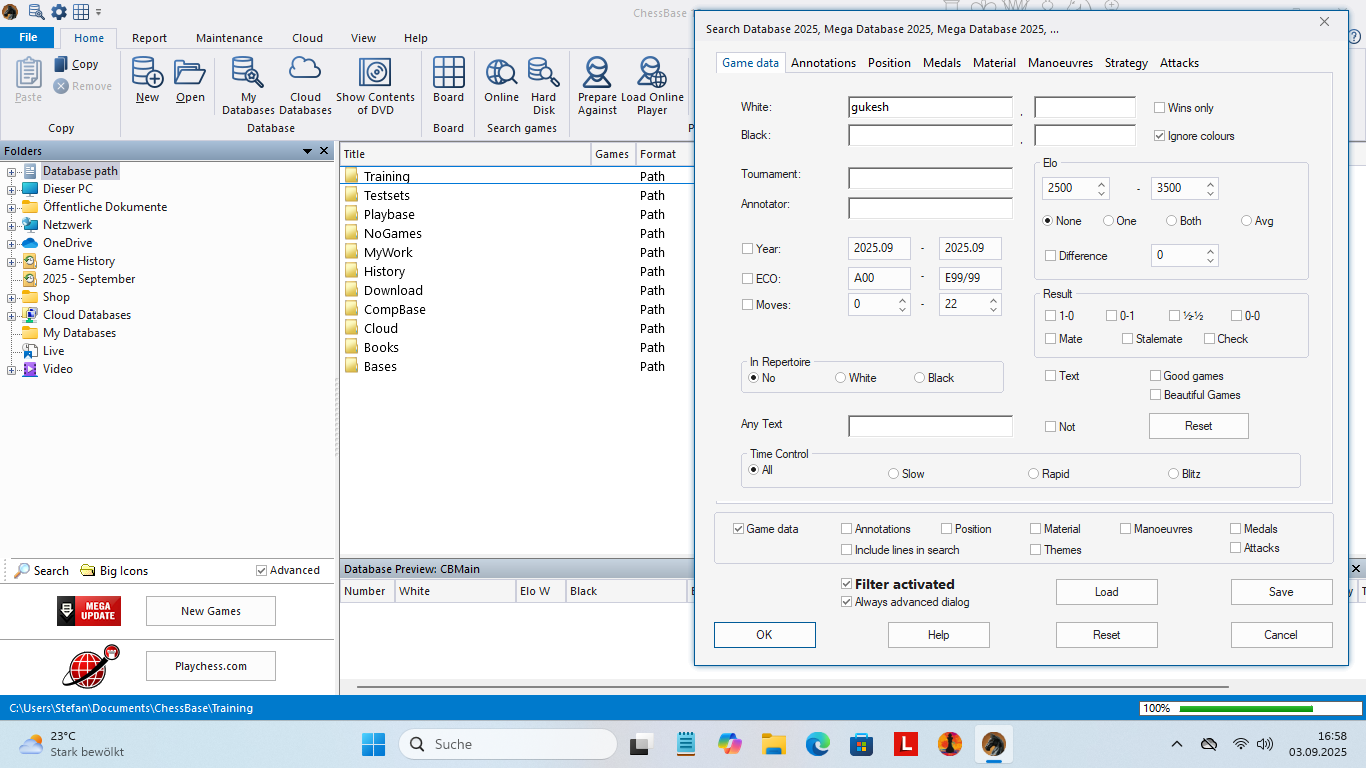
Example 1: You can start the search in a directory directly via the directory structure. By selecting a directory in which local databases are stored, you can start a search across all databases in this directory – without having to mark all the databases individually (see Example 2):
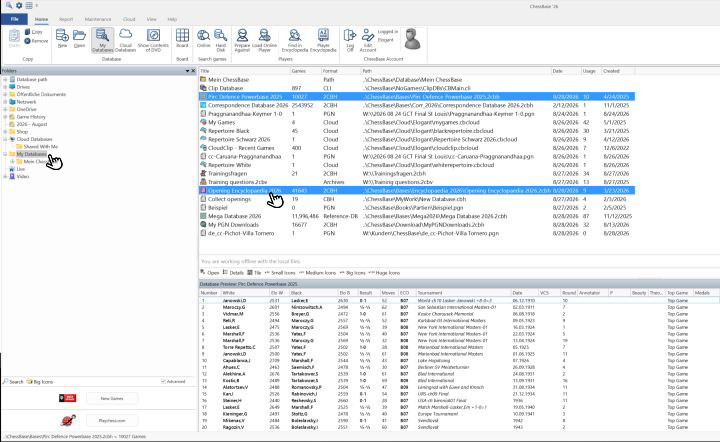
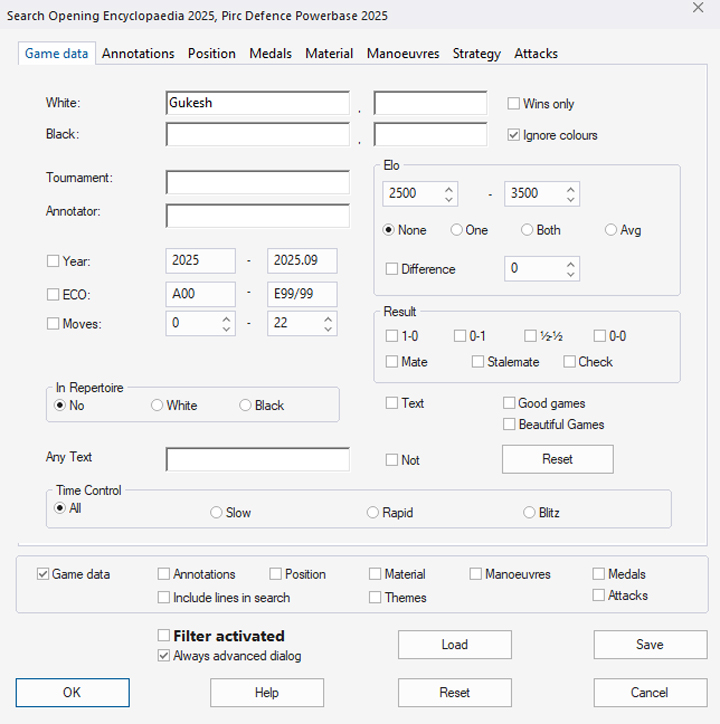
Example 2: You have installed the Opening Encyclopedia 2026 and want to search for games by World Champion Gukesh with White. To do this, go to "My Databases" and in the main window to "Opening Encyclopedia 2026". You can even select two or more databases (CTRL + left mouse button, or SHIFT + left mouse button for entire blocks) and search them simultaneously:
Then click on "Search" and in the mask that opens, enter the player you are looking for under White. Then click "OK" (or enter additional desired parameters beforehand):
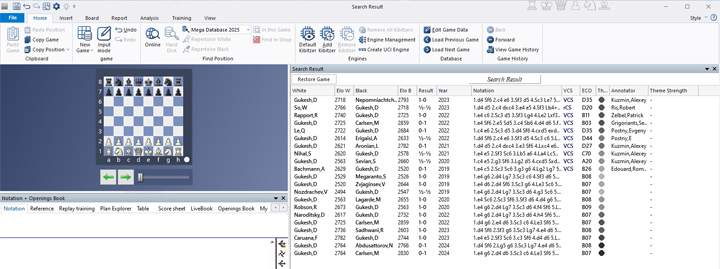
The search result that appears after a few moments looks like this:
YOUR EASY ACCESS TO OPENING THEORY: Whether you want to build up a reliable and powerful opening repertoire or find new opening ideas for your existing repertoire, the Opening Encyclopaedia covers the entire opening theory on one product.
YOUR EASY ACCESS TO OPENING THEORY
Be well prepared with the new Opening Encyclopaedia 2026! Whether you want to build up a reliable and powerful opening repertoire or find new opening ideas for your existing repertoire, the Opening Encyclopaedia covers the entire opening theory on one product and is the ideal start for your opening training. Many new articles enrich the current theory with new or revisited ideas. The Encyclopaedia can help you learn openings quickly and give you a head start on your next opponent. Each article contains explanations and annotated games illustrating typical plans to deepen your understanding.
Big Icons
The option is quickly explained: there are two settings that format the directory structure differently – just click and choose the one that suits your preference.
The free app from ChessBase! ChessBase Mobile has everything you need as a chess player on the go:
access your chess data in cloud databases - and 13 million games.
ChessBase Mobile has everything you need as a chess player on the go:
- Access the ChessBase online database - with more than 13 million games: search for players, positions, openings etc.
- Save your own games and analyses in cloud databases
- Synchronise your personal databases across all your devices
- Analyse your games with the built-in engine
- Live opening book: use the most comprehensive and up-to-date statistics for every opening position
- Access your opening repertoire in the cloud: create and edit your personal opening repertoire
- 300 opening overviews, with repertoire suggestions: get started with new systems!
- Practise opening variations with three modes.
- Advanced notation: add comments, symbols, variations, arrows and markings to your games
- Advanced sharing options: share games and positions via link, image, GIF, FEN or QR code
- PGN compatibility: upload and download games or databases as PGN files
------
ChessBase has developed over decades to become what it is now in its 2026 version. The program has countless options, which we will present here in small portions – so you can design your interface for pleasant daily use and keep learning about new options and how to use them to get the most out of ChessBase´26 and save time.
We hope that this tip will help you to have more fun and be more successful when using ChessBase´26. You can find more tips and hints on our support pages and FAQ pages.
All parts of the series and more links:
YOUR EASY ACCESS TO OPENING THEORY: Whether you want to build up a reliable and powerful opening repertoire or find new opening ideas for your existing repertoire, the Opening Encyclopaedia covers the entire opening theory on one product.
YOUR EASY ACCESS TO OPENING THEORY
Be well prepared with the new Opening Encyclopaedia 2026! Whether you want to build up a reliable and powerful opening repertoire or find new opening ideas for your existing repertoire, the Opening Encyclopaedia covers the entire opening theory on one product and is the ideal start for your opening training. Many new articles enrich the current theory with new or revisited ideas. The Encyclopaedia can help you learn openings quickly and give you a head start on your next opponent. Each article contains explanations and annotated games illustrating typical plans to deepen your understanding.
- Beginner´s Tips Part 1: Entering and Saving Your Own Games
- Beginner´s Tips Part 2: Insert variations and add engines
- Beginner´s Tips Part 3: Insert variations from references and engines
- Beginner´s Tips Part 4: Figurines and Colours
- Beginner´s Tips Part 5: Annotations
- Beginner´s Tips Part 6: Quick access toolbars and variation hierarchies
- Beginner´s Tips Part 7: Organising databases!
- Beginner´s Tips Part 8: Together what belongs together...!
- Beginner´s Tips Part 9: Tactical Analysis
- Beginner´s Tips Part 10: Standard Layout or Custom Layout
- Beginner's Tips, Part 11: Multitasking with several windows
- Beginner's Tips, Part 12: Arrows and marks
- Beginner's Tips, Part 13: Powerbooks and Powerbases
- Beginner's Tips, Part 14: Save resources with remote engines
- Beginner's Tips, Part 15: Setting up and analysing positions
- Beginner's Tips, Part 16: Setting up and analysing positions (Part 2)
- Beginner's Tips, Part 17: Choosing your board design
- Beginner's Tips, Part 18: What the mouse can do!
- Beginner's Tips, Part 19: Find model games for training
- Beginner's Tips, Part 20: Award medals to your best games!
- Beginner's Tips, Part 21: Maximum Training Effect with the Power Tool "Replay Training" (Part 1)
- Beginner's Tips, Part 22: Maximum training effect with the ‘Replay Training’ power tool (Part 2)
- Beginner's Tips, Part 23: Stay up to date with program updates
- Beginner's Tips, Part 24: Always get the latest games via update
- Beginner's Tips, Part 25: Customizing your view – how to see what matters
- Beginner's Tips, Part 26: Null moves: The art of doing nothing
- Beginner's Tips, Part 27: Creating Effective Training Material (Part 1)
- Beginner's Tips, Part 28: Creating Effective Training Material (Part 2)
- Beginner's Tips, Part 29: Creating Effective Training Material (Part 3)
- ChessBase´26: A Players Guide (1)
- ChessBase´26: A Players Guide (2)
- ChessBase´26: A Players Guide (3)
- ChessBase´26: A Players Guide (4)
- ChessBase´26: A Players Guide (5)
- Videos:
Matthias Wuellenweber on all new functions for ChessBase 26
ChessBase 26 - The interview with Matthias Wuellenweber
Matthias Wuellenweber - The Complete Guide to the ChessBase 26 Opening Report
Matthias Wuellenweber - The Complete Guide to the ChessBase 26 Monte-Carlo-Analysis
Dorian Rogozenco: How a GM uses the new ChessBase 26 opening report
Dorian Rogozenco: How a Grandmaster Uses the New ChessBase´26 Monte-Carlo Analysis
_REPLACE_BY_ADV_5

















.jpeg)

.jpeg)