What is a remote engine?
 The free app from ChessBase! ChessBase Mobile has everything you need as a chess player on the go:
access your chess data in cloud databases - and 13 million games.
The free app from ChessBase! ChessBase Mobile has everything you need as a chess player on the go:
access your chess data in cloud databases - and 13 million games.
ChessBase Mobile has everything you need as a chess player on the go:
- Access the ChessBase online database - with more than 13 million games: search for players, positions, openings etc.
- Save your own games and analyses in cloud databases
- Synchronise your personal databases across all your devices
- Analyse your games with the built-in engine
- Live opening book: use the most comprehensive and up-to-date statistics for every opening position
- Access your opening repertoire in the cloud: create and edit your personal opening repertoire
- 300 opening overviews, with repertoire suggestions: get started with new systems!
- Practise opening variations with three modes.
- Advanced notation: add comments, symbols, variations, arrows and markings to your games
- Advanced sharing options: share games and positions via link, image, GIF, FEN or QR code
- PGN compatibility: upload and download games or databases as PGN files
For users who work with a notebook, using powerful engines often means high energy consumption, a loud fan and reduced computer performance. So it makes much more sense in every respect to use an engine from the Internet, giving you access to first-class external hardware that, unlike cloud engines, is always available and offers a wide range of options.
Find out more here about the remote engine option at ChessBase and how you can always access the resources of the data centre hardware – you only need to wait two to three minutes until the desired engine is ready.
This is exactly what ChessBase´26 enables you to do. You can access the Internet computing powerhouse via the "Add Kibitzer" menu.
EXPAND YOUR CHESS HORIZONS
Data, plans, practice – the new Opening Report In ChessBase there are always attempts to show the typical plans of an opening variation. In the age of engines, chess is much more concrete than previously thought. But amateurs in particular love openings with clear plans, see the London System. In ChessBase ’26, three functions deal with the display of plans. The new opening report examines which piece moves or pawn advances are significant for each important variation. In the reference search you can now see on the board where the pieces usually go. If you start the new Monte Carlo analysis, the board also shows the most common figure paths.
Switching on the remote engine
At the end of the second part of this tutorial, we showed you how to add an engine. In the same "Add a Kibitzer" menu, you will see "Remoteengine" next to the engines installed on your computer. You can simply click on this or set it as the "Default Engine" by right-clicking on the selected engine and checking the box next to "Default engine" in the "Properties" menu that opens.
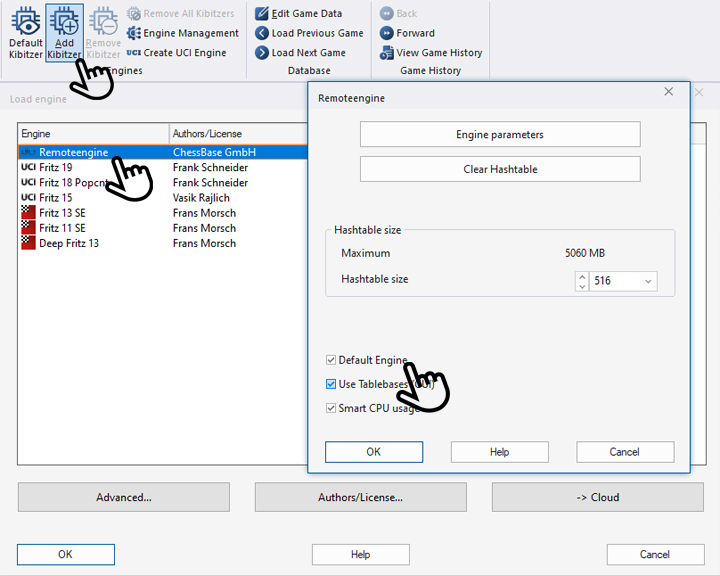
Once you have made your selection, click on "OK" and the following window will open:
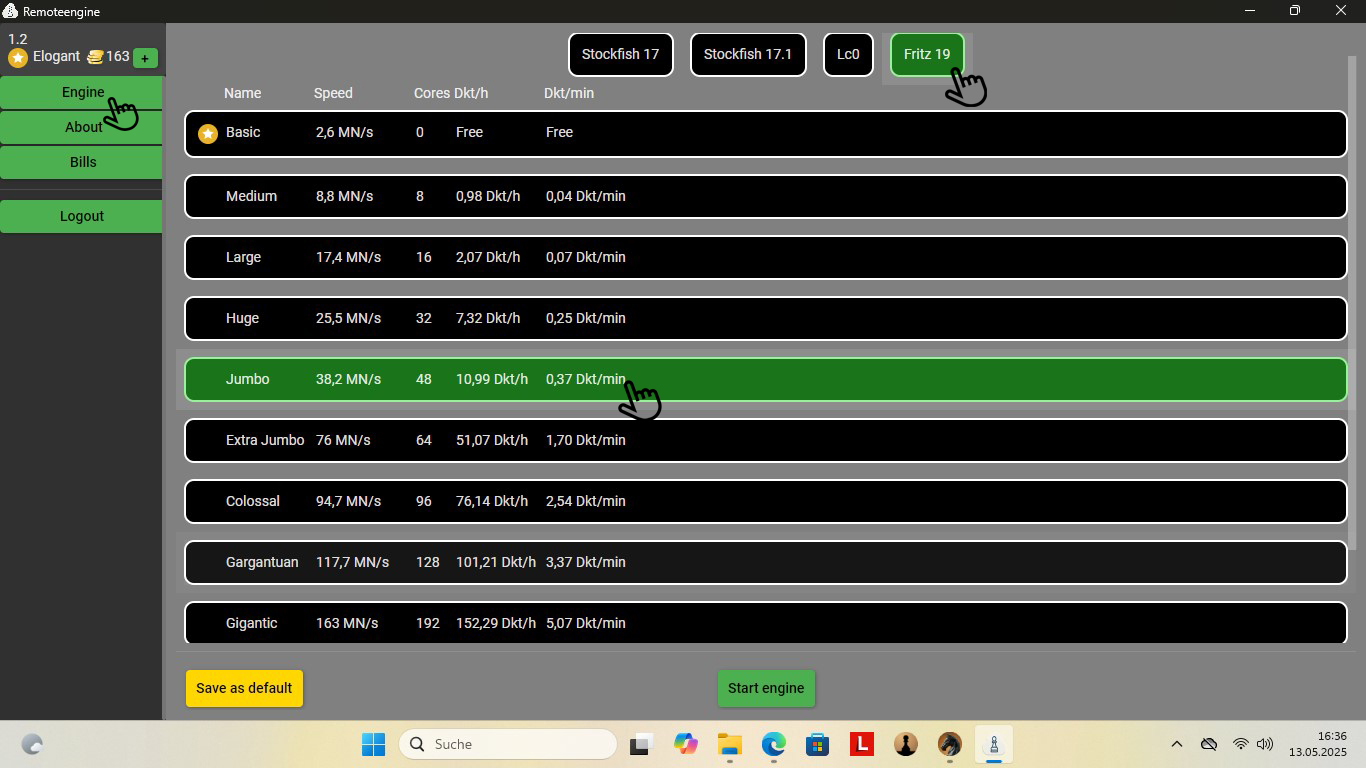
Three points are highlighted in the screenshot above:
- Left hand: Click on "Engine" to see the view shown (click on "Bills" for an overview of your usage to date).
-
Hand at the top: Here you can select the desired engine. In the selection below, you will see the names of the engines available, their speed, the processor cores used by the engine and the costs per hour or minute. Free engines are available for ChessBase Premium accounts.
- Hand down: Here you decide whether you want to bill the engine by the hour or by the minute. You can also have the selected engine start automatically.
In this video course, I’d like to assist you with handling time management during your game. How to avoid it, and how to react when you’ve no other choice.
 You will learn how Black's dynamic piece activity and structural counterplay more than compensate for White's extra tempo in the colour-reversed setups.
The Benoni family of openings has toppled world champions, decided match games under the highest pressure, and rewarded those brave enough to play them with some of the most electrifying chess imaginable. In this Fritztrainer, Grandmaster Ivan Sokolov - continuing his successful series "Understanding Middlegame Structures" - takes you deep inside the complexities of the Colour-Reversed Benoni, the Colour-Reversed Benko Gambit, and the Colour-Reversed Blumenfeld Gambit.
Free sample video: Introduction
Free sample video: Colour Reversed Banoni - Game 1
Example:
In the field above for Fritz 19, you can see that the "*Basic" engine is available free of charge for the Premium account, providing a speed of 2.6 MN/s (million knots per second). You can see that it is free of charge from the two ‘Free’ entries in columns 4 and 5.
Jumbo is marked in green. This engine is about 15 times faster (note: this does not mean that it plays 15 times better, but that it calculates 15 times faster). You can rent this "rocket" for 10.99 ducats per hour or 0.37 ducats per minute.
If this is too cheap or too expensive for you, simply select another engine. Incidentally, Lc0 is now also available here, an engine that won against Nakamura in blitz, even though it gave the top human opponent a knight!
Benefits of engine selection
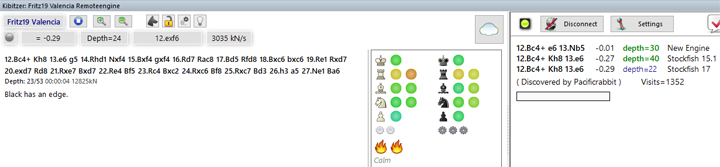
Select "Save as Default" (bottom left in yellow) to save your selection and "Start engine" (bottom centre) to switch to your analysis window with the selected engine:
 You will see the white pawn in your taskbar when the remote engine is activated. You can use this to switch to the remote engine window at any time.
Pro tips (see screenshot below):
- If you want to conserve further resources, deactivate the Buddy Engine by clicking on the dog icon to change it from green to grey.
- Click on the lock to close it and you can make moves on the board while the engine continues to calculate the position in which you closed the lock.
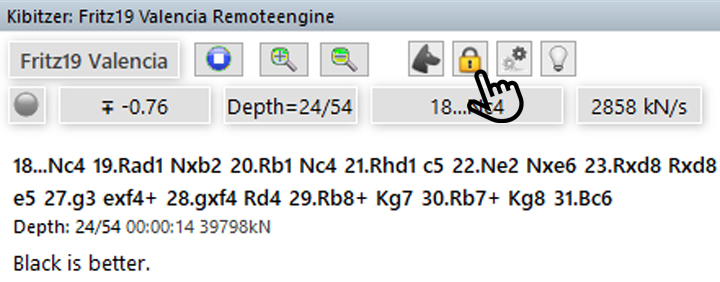
We hope you and your computer enjoy resource-efficient computing.
------
ChessBase has developed over decades to become what it is now in its 2026 version. The program has countless options, which we will present here in small portions – so you can design your interface for pleasant daily use and keep learning about new options and how to use them to get the most out of ChessBase´26 and save time.
We hope that this tip will help you to have more fun and be more successful when using ChessBase´26. You can find more tips and hints on our support pages and FAQ pages.
All parts of the series and more links:
The premiere chess database with over 11.7 million games
The ChessBase Mega Database 2026 is the premiere chess database with over 11.7 million games from 1475 to 2025 in high quality.



.jpeg)