
.jpeg)

As is often the case in ChessBase, there are several ways to work with databases. In episode 7 of this tutorial series, we already explained some basic database functions. In the context of this episode, you can get to know another method:
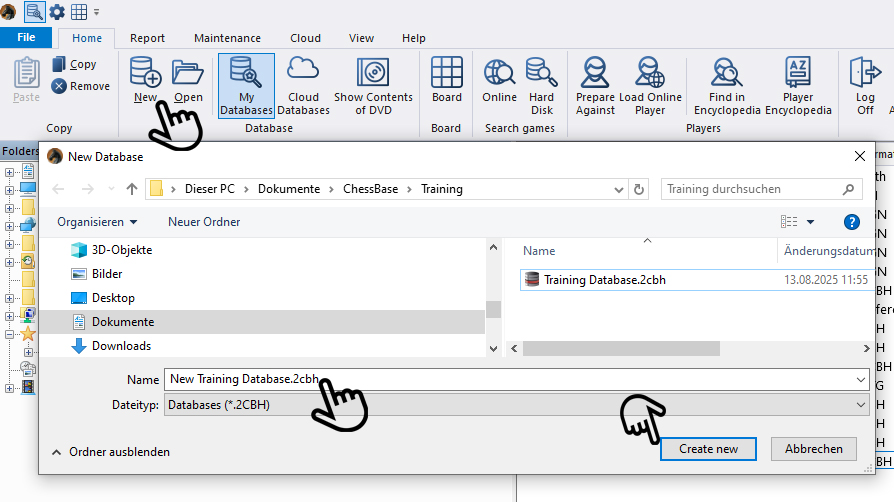
The three hands show the way: Click first at the top on "New" to create a new database — you can also do this via the "File" menu. Then, in the menu window that opens, select the folder where you want to save the new database and give the database a name. Finally, click "Create new" in the bottom right.
This database will now also appear in the "My Databases" window.
Games and themes for the database
Here we describe three examples of how you can fill your database with training games:
Games from the Mega Database on specific themes
We want to find checkmate positions to demonstrate checkmating for beginners. In the Romantic era of chess, the likelihood of a game being played all the way to checkmate was certainly higher. So we decide to look for games by Paul Morphy in which checkmate occurred.
To do this, in the Mega Database select the "Players" tab, enter the name at the bottom, and then click on "Dossier" at the top (Shortcut: CTRL+ALT+D):

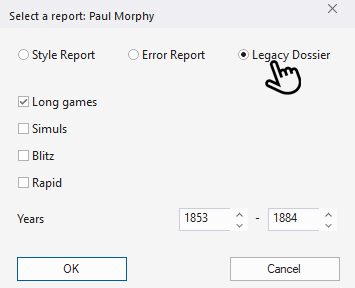
In the menu window that opens, click on "Legacy Dossier" and then on "OK":
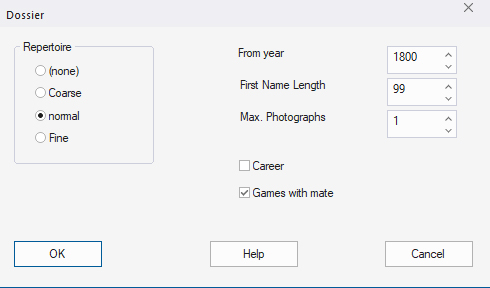
In the new window, check "Games with mate" and confirm again with "OK":
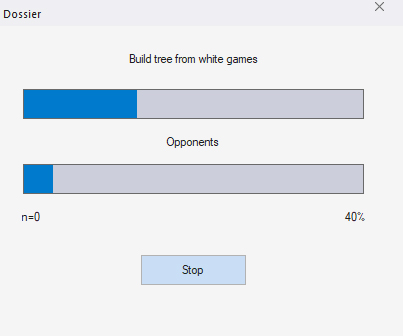
The dossier is generated, which may take a while:
The result then looks as follows (excerpts):
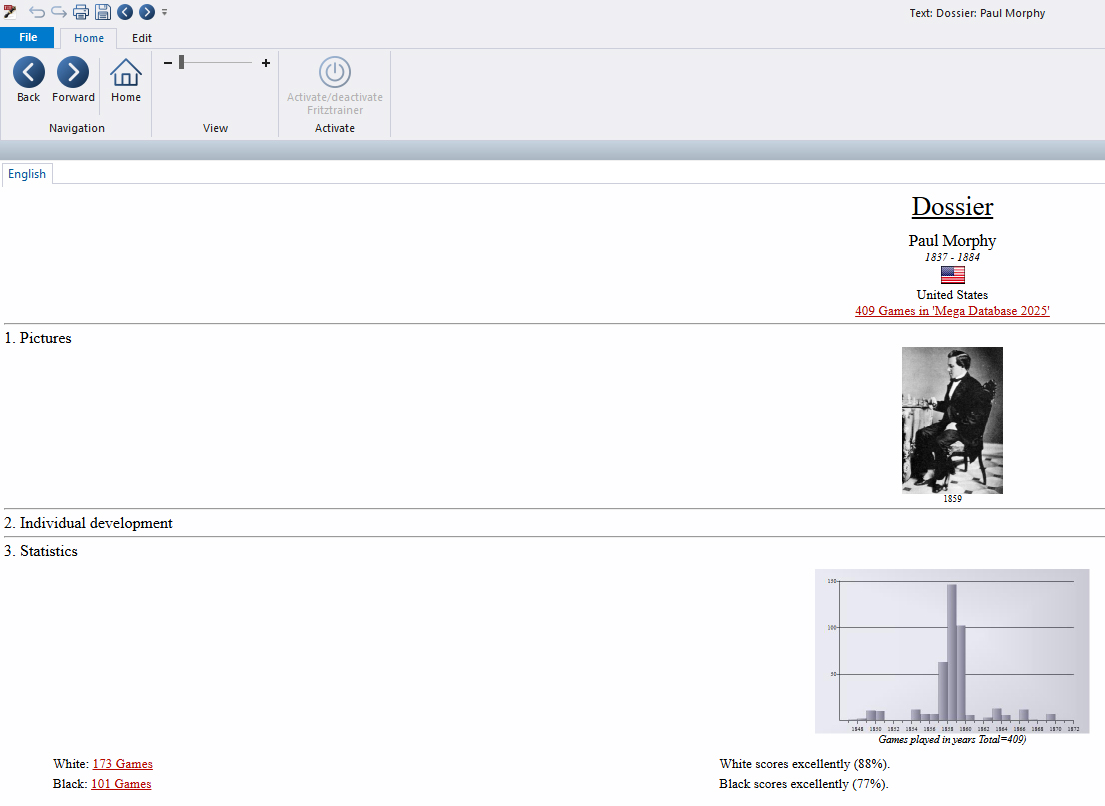

Here you can now see several games by Morphy that ended in checkmate. If you click on the red links, the games will open in a new window.
If, in this new window, you go to "File" in the main menu and select "Save as new game," this selection window will open. Here, choose the directory you created above and the database you set up, in order to store the game there via the "New/Open" button:

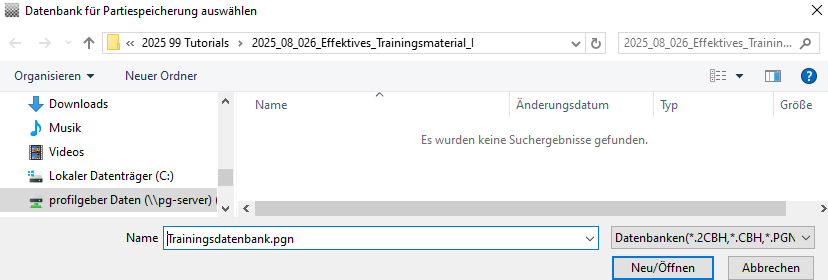
This way, you can expand the database with additional Morphy games or games by other masters.
Using material from the ChessBase Magazine (CBM)
If you want to work with a ready-made database, you can, for example, use the already prepared tactics database from the ChessBase Magazine section "Tactics Total." To do this, click in the CBM on the section and the corresponding article there:
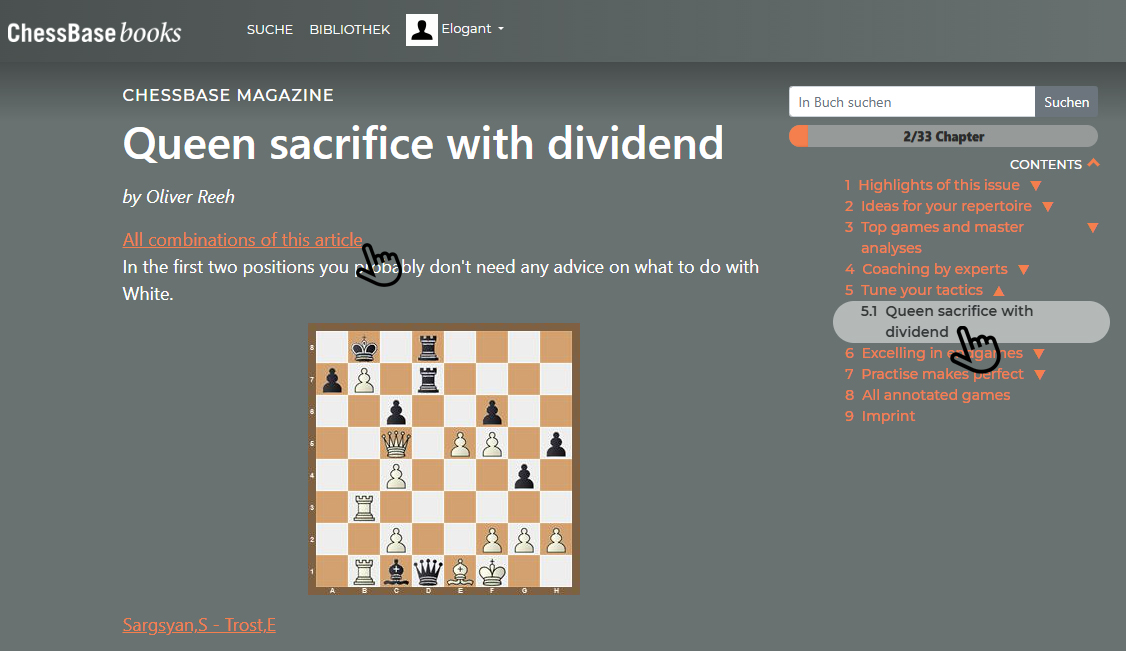
There you will find the practical option "All tactical exercises from this article." If you click there, this window will open:
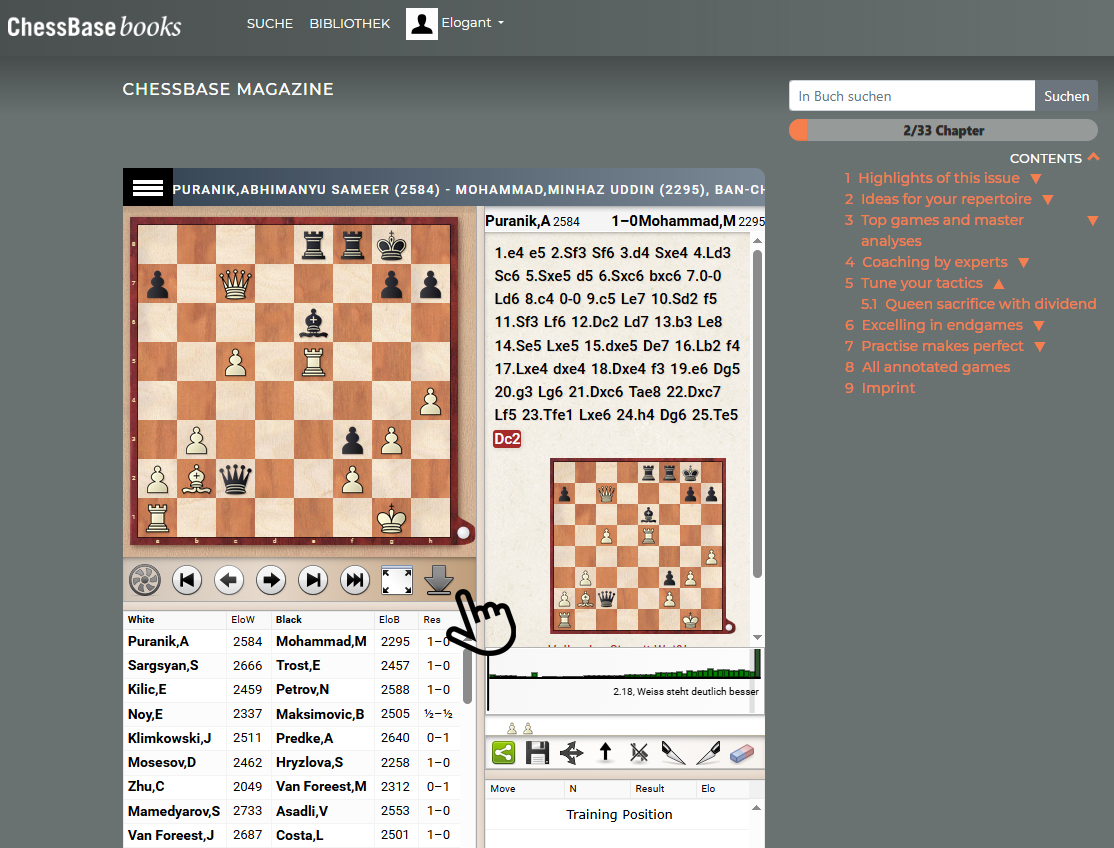
All the tactical exercises are displayed below the left diagram. With a click on the arrow, you can start the download:

If you select the top option "Download & Copy – PGN," the database will be saved as a PGN in your downloads folder. If ChessBase 18 is open, the database will also appear simultaneously in these two windows:
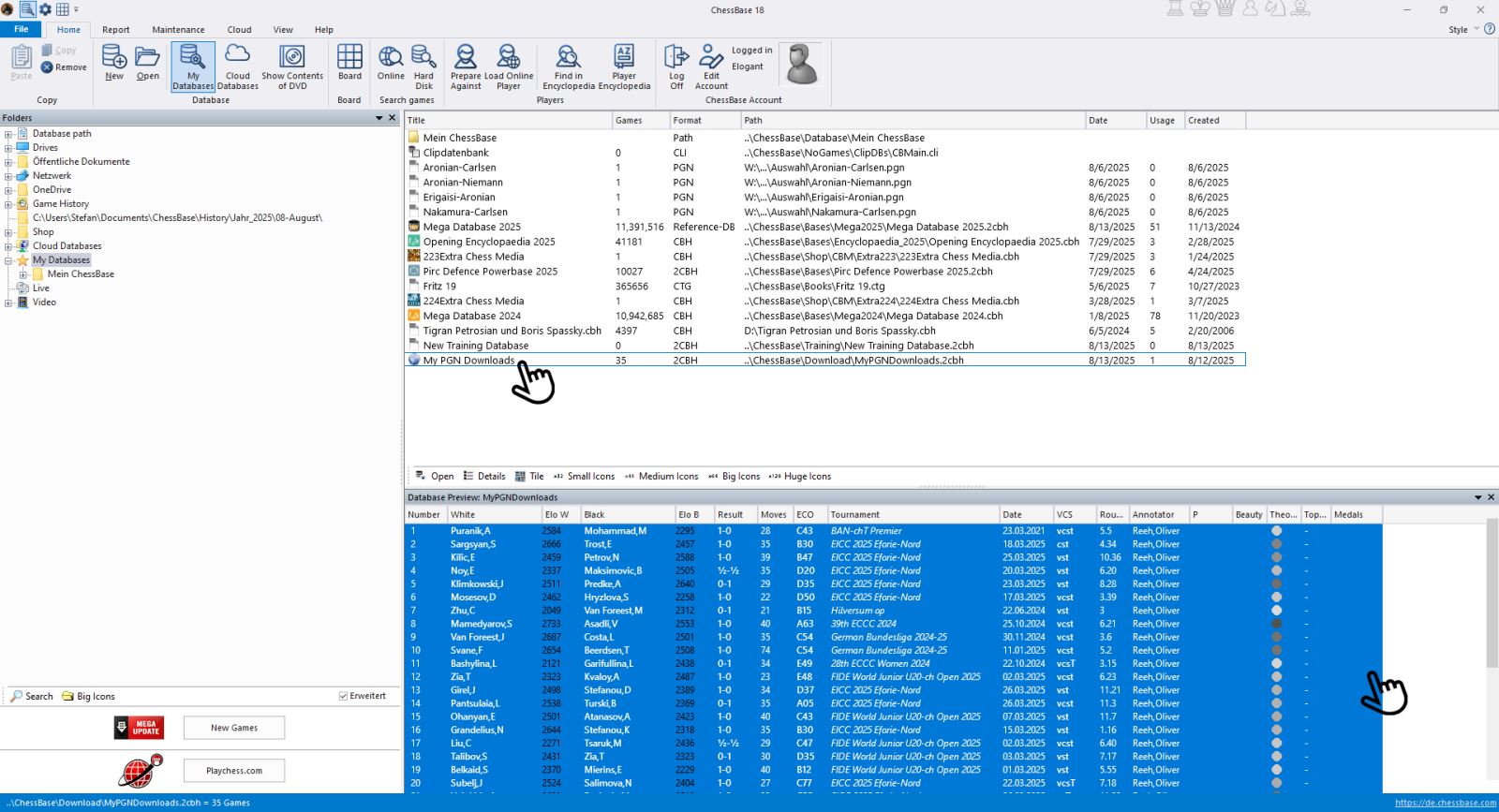
Now, as described above, you can create a new database and insert individual games there, or mark all games and drag & drop them into it. Don’t forget to save!
Adding games "by hand" to a database
Of course, you can also insert games into a new or existing database that you notice somewhere else or come across by chance. If you have the PGN, you already know the procedure. If, for example, you see a nice combination in a magazine, you can also integrate this position into the database via "Set up position" (see tutorial episodes 15 and 16).
Give it a try and create your databases with ChessBase 18, the Mega Database, the ChessBase Magazine, or other sources! There are many possibilities ... In the next episode, you will learn how to transform this database into your own training material, as Oliver Reh does in the ChessBase Magazine.
ChessBase has evolved over decades to become what it is today with its 18th version. The programme has countless options, which we will introduce here in small chunks – so you can customise your interface for everyday use and continually discover and learn new options to get the most out of ChessBase 18 and save time.
You can find more tips and hints on our support pages and FAQ pages.
All parts of the series:
Beginner's Tips Part 1: Entering and Saving Your Own Games
Beginner's Tips Part 2: Creating Variations and Activating the Engine
Beginner's Tips Part 3: Inserting Variations from References and the Engine
Beginner's Tips Part 4: Figurines and Colours
Beginner's Tips Part 5: Annotating
Beginner's Tips Part 6: Quick Command Bars and Variation Hierarchy
Beginner's Tips Part 7: Organizing Your Database Correctly!
Beginner's Tips Part 8: Putting Together What Belongs Together...!
Beginner's Tips Part 9: "Tactical Analysis"
Beginner's Tips Part 10: "Standard Layout or Custom Layout"
Beginner's Tips Part 11: Multitasking with Several Windows
Beginner's Tips Part 12: Arrows and Marks
Beginner's Tips Part 13: Powerbooks and Powerbases
Beginner's Tips Part 14: Save Resources with Remote Engines
Beginner's Tips Part 15: Setting Up and Analysing Positions (Part 1)
Beginner's Tips Part 16: Setting Up and Analysing Positions (Part 2)
Beginner's Tips Part 17: Choosing Your Board Design
Beginner's Tips Part 18: What the mouse can do!
Beginner's Tips Part 19: Find model games for training
Beginner's Tips Part 20: Award medals to your best games!
Beginner's Tips Part 21: Maximum Training Effect with the Power Tool "Replay Training" (Part 1)
Beginner's Tips Part 22: Maximum Training Effect with the Power Tool "Replay Training" (Part 2)
Beginner's Tips Part 23: Stay up to date with program updates
Beginner's Tips Part 24: Always get the latest games via update
Beginner's Tips Part 25: Customizing your view - how to see what matters
Beginner's Tips Part 26: Null moves - The art of doing nothing