Imagine yourself sitting at the board – in the middle of a grandmaster game. Impossible?! No, because that's exactly what Replay Training in ChessBase 18 allows you to do.
In replay mode, you are not just a spectator, but an active part of the game: your decision is required for every move. Did you identify the right plan? Was your move strong enough—or was there a better option? The program gives you immediate feedback and transforms every game into an intensive, interactive training experience that noticeably deepens your understanding of chess.
As in the last two tutorial articles on awarding medals and getting started with replay training, we open the game Tal vs. Smyslov from the 1959 Candidates Tournament for illustration purposes. You can watch the entire game in the replayer:
No other World Champion was more infamous both inside and outside the chess world than Bobby Fischer. On this DVD, a team of experts shows you the winning techniques and strategies employed by the 11th World Champion.
No other World Champion was more infamous both inside and outside the chess world than Robert James Fischer. But what were the secrets to his sensational ability, and what enabled him to take on the Soviet school of chess alone – and win? On this DVD, a team of experts presents you every facet of the chess legend, and shows you the winning techniques and strategies employed by the 11th World Champion. Grandmaster Dorian Rogozenco delves into Fischer’s openings, and retraces the development of his repertoire. What variations did Fischer play, and what sources did he use to arm himself against the best Soviet players? Mihail Marin explains Fischer’s particular style and his special strategic talent in annotated games against Spassky, Taimanov and other greats. Karsten Müller is not just a leading international endgame expert, but also a true Fischer connoisseur. His congenial video analysis of Fischer’s legendary endgames can only be found on this DVD! To top it off - you too can unleash tactical combinations like Fischer! German Bundesliga player Oliver Reeh has compiled the World Champion’s best combinations – and now it’s your move. You too can try to find Fischer’s stunning brilliancies by entering your solution on the board and receive video feedback in the new ChessBase media format!
• Video running time: approx. 5 hours (English)
• Interactive tactics test with video feedback
• Collection of every Fischer game, tables, backround knowledge, short biography
• “Fischer powerbook”– the World Champion’s repertoire as an opening tree
• Tactic training: 100 Fischer games with training questions.
In the last article, we explained how to start the replay training mode in the notation window of ChessBase 18, how to use the basic functions, and how to get the most out of the training effect. In this article, we explain which additional functions you can use and how to do so.
Use the replay training tools!
Lifebuoy
We've already explained that the radar board shows the game after three more moves. This is also given as a text hint, and tips appear automatically after the opening phase. However, if you're having trouble figuring out the right opening moves to reach the position on the radar board, you can get help:
Simply click on the lifebuoy icon. And don't worry: This little help won't cost you any points!
In our example game, clicking on the lifebuoy on the fifth move would result in the following tip:
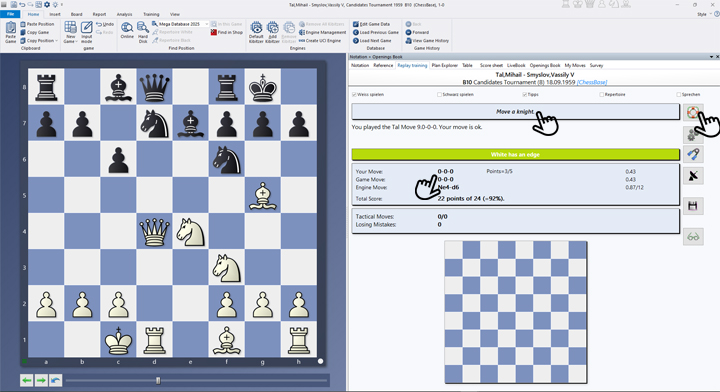
- In the screenshot, the right hand shows the lifebuoy that needs to be clicked for a tip.
-
After clicking, the tips will appear in the top centre—there may be several. It is therefore worth clicking several times. Even if you are inactive for a while, another tip will appear.
-
Below this, the move list is displayed, showing your own move, the game move and the engine move, which differs from the game move in this case.
Gears = “Manual Analysis”
The gear tool is also a handy tool. Click here to pause the replay training. You can now analyse the position—but without ChessBase 18 support. If you click the icon again, you'll return to the position where you previously clicked on the gears.
Hand muscle trainer = ‘Assisted calculation’
This tool also interrupts the actual replay training. Now you can analyse the position blindly. To do this, simply execute the moves you want to analyse. To check, you can display the position reached at any time by right-clicking. You can return to the replay training by clicking on the sports equipment again.
Radar board
You're already familiar with the radar board. Click on the icon to activate and deactivate it.
Diskette
Saves the current position. This allows you to retain the original game and analyse it in your own version or continue the analysis at a later time.
Glasses
By clicking on the glasses, you can go through the game move by move and see the comments displayed for each move.

Talk
If you check the “Talk” box directly above the lifebuoy, the tips will be announced to you.
End of game
When the end of the game is reached, you will see the following view in the tip area:

Pro tips
- Combine the various tools and find the best practical approach for you. With a little practice, replay training can also be used excellently for training work in clubs.
- You can use the cursor keys to move back and forth in the game as you wish. With the frequently mentioned shortcut CTRL+Z, you can switch from your analysis back to the original game (you may want to save first).
- We'll explain the "Repertoire" option in more detail in a later tutorial. If you'd like to experiment with it, you can do so as follows:
Open a new board with Ctrl + N > Training > Standard Repertoires > Select an existing repertoire > In the "My Moves" tab, use Ctrl + C and Ctrl + V to copy the notation to the Notation tab > Only then click the "Replay Training" tab and check the "Repertoire" box.
Conclusion
If you want to improve your chess in a targeted manner and not just passively consume it, the replay training in ChessBase 18 is exactly the right tool for you. It turns every game into an active experience, challenging you to make your own decisions – with direct feedback and completely risk-free. The training is flexible, motivating, and enormously effective: You'll sharpen your positional feel, recognize typical motifs more quickly, and develop a deeper strategic understanding. Whether you're a beginner or an ambitious club player – this tool will help you progress noticeably and is also a lot of fun.
We hope you enjoy this great tool for interactive training.
------
ChessBase has evolved over decades to become what it is today with its 18th version. The programme has countless options, which we will introduce here in small chunks – so you can customise your interface for everyday use and continually discover and learn new options to get the most out of ChessBase 18 and save time.
You can find more tips and hints on our support pages and FAQ pages.
All parts of the series:
Beginner's Tips Part 1: Entering and Saving Your Own Games
Beginner's Tips Part 2: Creating Variations and Activating the Engine
Beginner's Tips Part 3: Inserting Variations from References and the Engine
Beginner's Tips Part 4: Figurines and Colours
Beginner's Tips Part 5: Annotating
Beginner's Tips Part 6: Quick Command Bars and Variation Hierarchy
Beginner's Tips Part 7: Organizing Your Database Correctly!
Beginner's Tips Part 8: Putting Together What Belongs Together...!
Beginner's Tips Part 9: "Tactical Analysis"
Beginner's Tips Part 10: "Standard Layout or Custom Layout"
Beginner's Tips Part 11: Multitasking with Several Windows
Beginner's Tips Part 12: Arrows and Marks
Beginner's Tips Part 13: Powerbooks and Powerbases
Beginner's Tips Part 14: Save Resources with Remote Engines
Beginner's Tips Part 15: Setting Up and Analysing Positions (Part 1)
Beginner's Tips Part 16: Setting Up and Analysing Positions (Part 2)
Beginner's Tips Part 17: Choosing Your Board Design
Beginner's Tips Part 18: What the mouse can do!
Beginner's Tips Part 19: Find model games for training
Beginner's Tips Part 20: Award medals to your best games!
Beginner's Tips Part 21: Maximum Training Effect with the Power Tool "Replay Training" (Part 1)




.jpeg)