5/11/2020 – ChessBase is a powerful program that helps you to enjoy your chess more and to play better. Still, for some even installing the ChessBase 15 can appear daunting at first glance, but it's actually an exceptionally simple process. Here Nick Murphy takes you step-by-step through the process. Tested and approved by his 6-year-old niece and 82-year-old father!
new: ChessBase Magazine 225
Chess Festival Prague 2025 with analyses by Aravindh, Giri, Gurel, Navara and others. ‘Special’: 27 highly entertaining miniatures. Opening videos by Werle, King and Ris. 10 opening articles with new repertoire ideas and much more. ChessBase Magazine offers first-class training material for club players and professionals! World-class players analyse their brilliant games and explain the ideas behind the moves. Opening specialists present the latest trends in opening theory and exciting ideas for your repertoire. Master trainers in tactics, strategy and endgames show you the tricks and techniques you need to be a successful tournament player! Available as a direct download (incl. booklet as pdf file) or booklet with download key by post. Included in delivery: ChessBase Magazine #225 as “ChessBase Book” for iPad, tablet, Mac etc.!
The entry into the chess cosmos. ChessBase 15 program + new Big Database 2019 (7.6 million uncommented games). Plus 3 issues ChessBase Magazine and CB Premium membership for 6 months!
In this video course experts examine the games of Steinitz. Let them show you which openings Steinitz chose, where his strength in middlegames were, how he outplayed his opponents in the endgame & you’ll get a glimpse of his tactical abilities!
€34.90
Installing ChessBase 15
Installing Chessbase 15 onto your Windows PC can appear daunting at first glance, but the process is incredibly simple and straightforward.
In fact, it is essentially just following each of the on-screen prompts, then clicking “install”.
But in case you’re still not convinced, let’s take you through the process step-by-step.
The following video guides you through the process, the text below explains the process step-by-step.
Installing via DVD disk or via download from the ChessBase shop
Whether installing Chessbase from a physical DVD disk or from a digital download, the process is remarkably similar. The main difference is how you get the process started.
If you are installing via a DVD disk, it’s worth noting that there are installation instructions inside the DVD Case. Many people miss these instructions or decide to skip reading them entirely. In my experience, this is never a good idea – no matter how competent you are with computers!
With a DVD, the installation process should start automatically when you insert the ChessBase 15 disk into your computer (if not, you will have to access the disk drive using Windows Explorer).
With a digital download, you locate the file (usually in your “Downloads” folder) and double-click it to start the process.
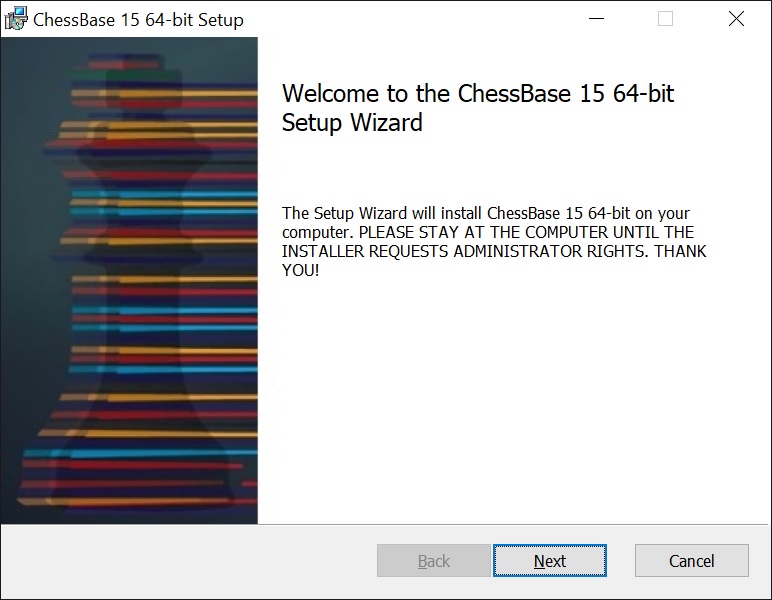
Once underway, the process is simply to read each prompt that appears and follow the instructions.
Getting started
Click “next”
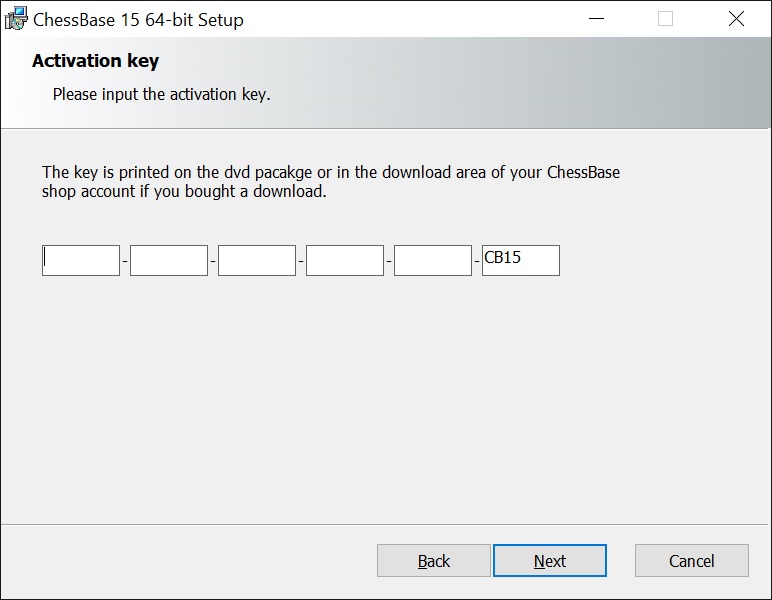
The next screen is probably the one that scares most people, but in fact, it’s incredibly simple:
Here you enter the 25-digit code that comes with your purchase of ChessBase 15.
If you are installing from DVD, then the code is printed on the inside of the case.
[TIP* If you’re having trouble entering the letters and numbers correctly, then don’t be afraid to get someone else to read them out to you while you type them in.]
If you’re installing from digital download, then your code will be available via your online ChessBase shop account, just below where you downloaded the ChessBase15 installation file.
[the code has been obscured in this example]
[TIP* If copy the code from your chessbase shop account before you begin the installation process, it should appear automatically in the boxes when you arrive at this stage.]
Click “next”
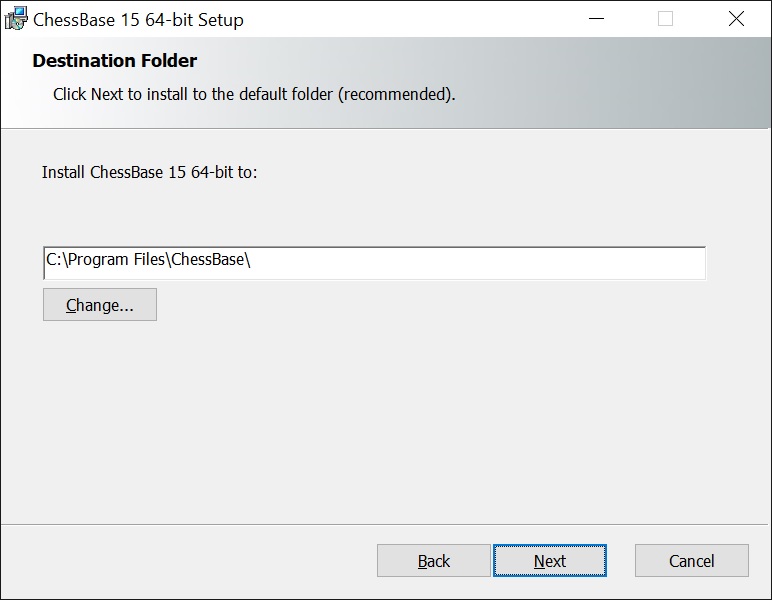
The next prompt is for selecting the default installation folder. It will probably be already set as “C:\Program Files\ChessBase\” or something similar.
For most people, there is no good reason to change anything here. Simply click “next”.
[Only change this if you are VERY confident that you have a good reason to, and you know what you are doing]
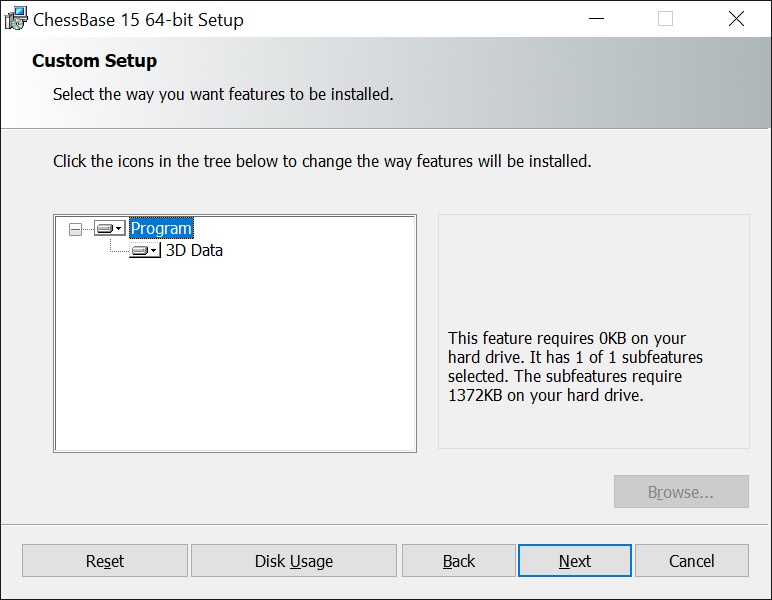
Custom Setup
Again, for most people, there is no good reason to change anything here. Simply click “next”.
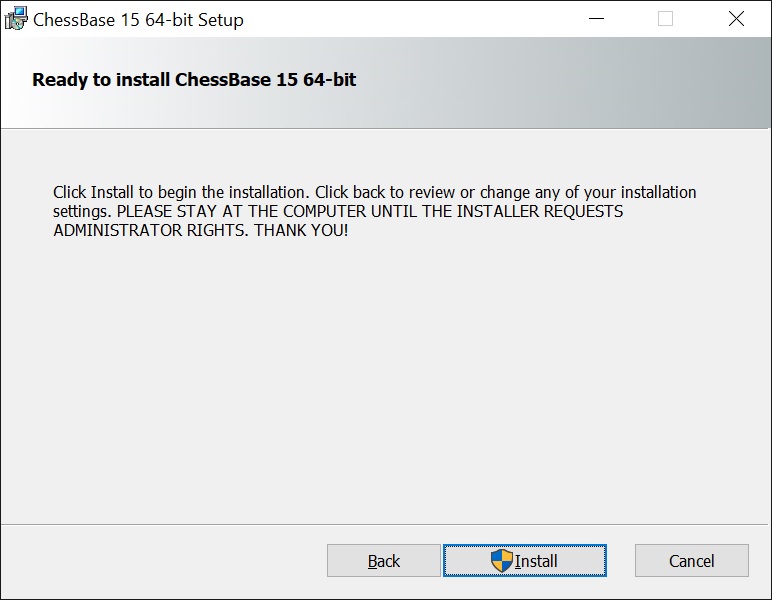
The program is all set to begin the installation. Hit “install”.
Here you may get a loud warning noise, and a scary looking prompt saying “Do you want to allow this app to make changes to your device?”. This is the Windows User Account Control, and is an important security feature to stop you accidentally installing unwanted programs. However, as we DO want to install the program, you can safely click “yes” here.
[The app name given should be “CBase15Setup.msi”]
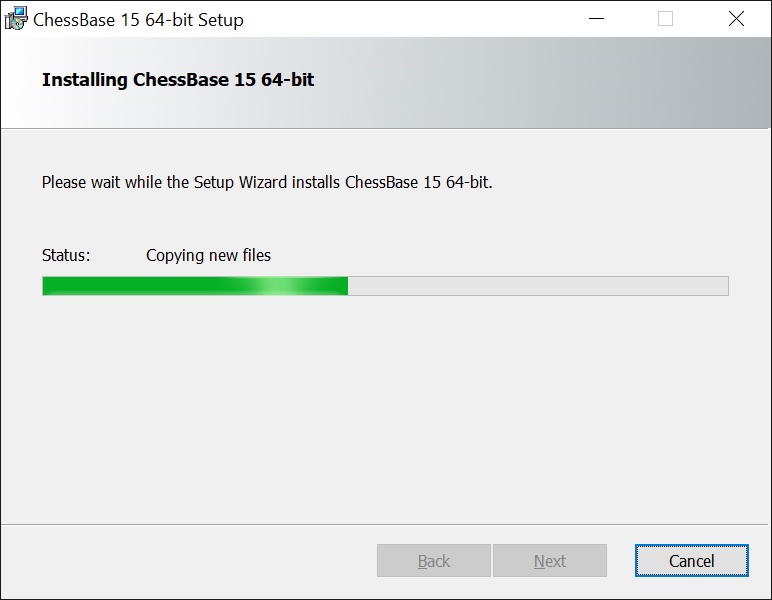
Then you wait a few moments as the program installs, and the status bar fills up green from the left.
The amount of time this takes will depend of your computer. But it shouldn’t take longer than about three/four minutes, and will likely be quicker.
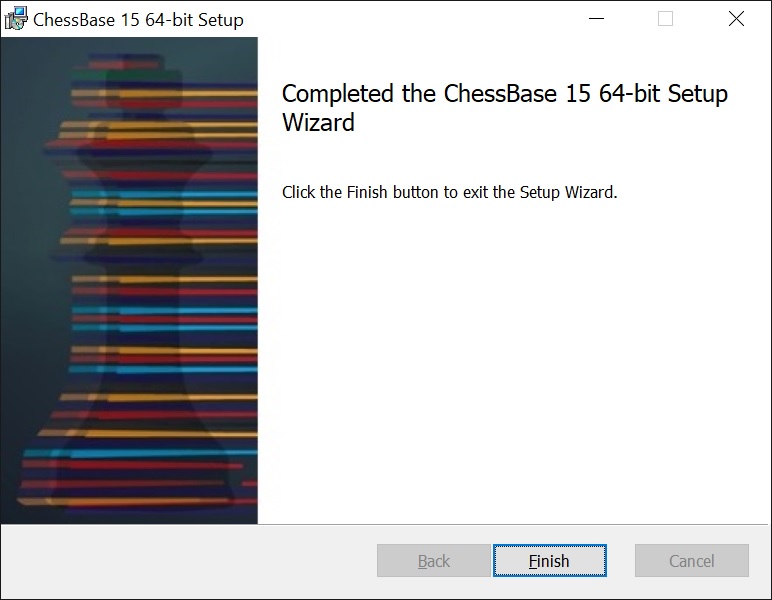
Congratulations! Just click “Finish”, and you’re done. The program is installed. You can now access it from your Windows start menu.
The entire process from start to finish will likely take no more than five minutes, and entirely consists of following the instructions on the screen at each stage.
I tested this on my 6 year old niece, and my 82 year old father; and aside from Dad entering the code incorrectly one time (despite me reading it out to him!), they both agreed that it was a simple and straightforward. And if they can do it, believe me – you can too!
In the next article, we’ll take our first look at ChessBase15 after installation, and look at activating and updating.
Nick MurphyNick Murphy is an actor, chess enthusiast, and an acknowledged chess-software expert.
Living in London; he has co-authored three DVDs for ChessBase alongside International Master Lorin D'Costa.
As well as authoring hundreds of videos on how to get the most from your ChessBase software.
YOUR PERSONAL CHESS COACH - Whether you’re taking your first steps into the world of club chess, or already playing at a tournament level: with FRITZ, you can train more efficiently, intelligently and with a more personalised approach than ever before.
Michael Kotyk presents a complete repertoire after 1.e4 e5, built around creative ideas, surprising move orders, and practical weapons designed to catch your opponents off guard.
Michael Kotyk presents a complete repertoire after 1.e4 e5, built around creative ideas, surprising move orders, and practical weapons designed to catch your opponents off guard.
Michael Kotyk presents a complete repertoire after 1.e4 e5, built around creative ideas, surprising move orders, and practical weapons designed to catch your opponents off guard.
“Attack with Qh5!!” – Tactical training with Oliver Reeh, “6…g5 – nothing ventured, nothing …” – Le Quang Liem comments on one of his victories in Biel, “Grischuk’s stroke of genius” – Petra Papp reveals a surprise in the Sicilian Kan Variation, and much
YOUR PERSONAL CHESS COACH - Whether you’re taking your first steps into the world of club chess, or already playing at a tournament level: with FRITZ, you can train more efficiently, intelligently and with a more personalised approach than ever before.
While tactics decide the game in concrete moments, strategy guides the entire battle. Understanding how to improve your pieces, create weaknesses, execute maneuvers, and steer the game toward favorable structures is what defines strong players.
The Italian Four Knights is the ideal choice. It combines the solid foundation of classical openings like the Ruy Lopez or the Italian Game with an active, initiative-driven style of play.
€24.90
We use cookies and comparable technologies to provide certain functions, to improve the user experience and to offer interest-oriented content. Depending on their intended use, analysis cookies and marketing cookies may be used in addition to technically required cookies. Here you can make detailed settings or revoke your consent (if necessary partially) with effect for the future. Further information can be found in our data protection declaration.
Pop-up for detailed settings
We use cookies and comparable technologies to provide certain functions, to improve the user experience and to offer interest-oriented content. Depending on their intended use, cookies may be used in addition to technically required cookies, analysis cookies and marketing cookies. You can decide which cookies to use by selecting the appropriate options below. Please note that your selection may affect the functionality of the service. Further information can be found in our privacy policy.
Technically required cookies
Technically required cookies: so that you can navigate and use the basic functions and store preferences.
Analysis Cookies
To help us determine how visitors interact with our website to improve the user experience.
Marketing-Cookies
To help us offer and evaluate relevant content and interesting and appropriate advertisement.