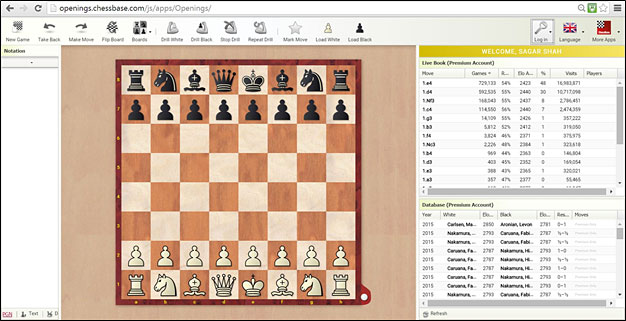
11/30/2015 – Memorizing humongous amount of opening theory is one of the biggest problems faced by chess players at all levels. But in the ChessBase Account there is a new web based application called Openings Trainer which can help you overcome the difficulty. In this article we explain you the features of this app, with step by step screen grabs. There is also a video you should watch.
new: ChessBase Magazine 225
Chess Festival Prague 2025 with analyses by Aravindh, Giri, Gurel, Navara and others. ‘Special’: 27 highly entertaining miniatures. Opening videos by Werle, King and Ris. 10 opening articles with new repertoire ideas and much more. ChessBase Magazine offers first-class training material for club players and professionals! World-class players analyse their brilliant games and explain the ideas behind the moves. Opening specialists present the latest trends in opening theory and exciting ideas for your repertoire. Master trainers in tactics, strategy and endgames show you the tricks and techniques you need to be a successful tournament player! Available as a direct download (incl. booklet as pdf file) or booklet with download key by post. Included in delivery: ChessBase Magazine #225 as “ChessBase Book” for iPad, tablet, Mac etc.!
YOUR PERSONAL CHESS COACH - Whether you’re taking your first steps into the world of club chess, or already playing at a tournament level: with FRITZ, you can train more efficiently, intelligently and with a more personalised approach than ever before. FRITZ is more than just a chess engine – it’s a training revolution! Whether you’re taking your first steps into the world of club chess, or already playing at a tournament level: with FRITZ, you can train more efficiently, intelligently and with a more personalised approach than ever before.
“Mate is great!” – Tactical training with Oliver Reeh, “The 8th rank” – Andy Woodward analyses his game against Magnus Carlsen from TePe Sigeman 2026, “A modern Nimzo-Indian” – Andrei Volokitin introduces readers to "his" system and much more!
€21.90
Become an opening expert
The Openings Trainer is one of the most recent and useful web based applications
developed by ChessBase. In order to use it you need to go to "Openings"
in the ChessBase Account menu and login with your ChessBase account or Playchess
ID.
The Openings Trainer page has a lot of features
on it
So let’s get acquainted with this exciting new application. There
are two main functions:
Organize your openings and
Remember them through regular drills
The Openings Trainer can be used to learn an opening, but its main function
is to help you get organized and better at the variations you have already
prepared.
The first thing you do is to start feeding in the moves of the opening
you would like to study on the Openings Trainer board. You can make use
of the Live Book, which has seven million games, in the form of a tree for
this. Below the Live Book you have the Live Database which updates with
the latest games as soon as the moves are made.
Let’s say you want to work on the Queen’s Gambit 5.Bf4 variation.
After making the initial moves 1.d4 Nf6 2.c4 e6 3.Nf3 d5 4.Nc3 Be7 5.Bf4,
you mark the 5.Bf4 as your move using the “Mark Move” function.
The mark move function lies on top at the tool
bar with other options.
You can also right click on a specific move and mark the move.
You will see an asterisk on top of the move
Bf4 and these five moves get added to your white repertoire
As the moves are made, the list of the live database also keeps getting
updated. You can see the latest game that happened in this line is the top
level encounter between Inarkiev against Aronian from the EU Cup just a
few days ago.
After 5.Bf4 you make the moves 5…0-0 6.e3 Nbd7. At this point suppose
it is very important for you to remember to make the positional move 7.a3
here, instead of the aggressive 7.c5. So you make the move a3 and right
click on it and choose “mark as important move.”
Mark as important move is used when you would
like to remember an important move in your repertoire.
You will see two asterisks on your move a3
and the entire sequence of seven moves
gets added to your white repertoire
What is described here was a simple line with only one branch. You can
add intricate variations lasting more than 20 moves with many branches and
save them in your repertoire. Every time you would like to save a particular
line just mark the final move (final white move if it is a white repertoire)
as “your move.”
Once you have built a decent white repertoire, you can then choose the
very unique function called “Drill White”.
With the drill function the computer will take the black side and ask you
to make the first white move. As soon as you play 1.d4 it will reply with
1…d5. It will always try to remain in your repertoire until you deviate.
Now you can either make your repertoire move 2.c4, or something else say
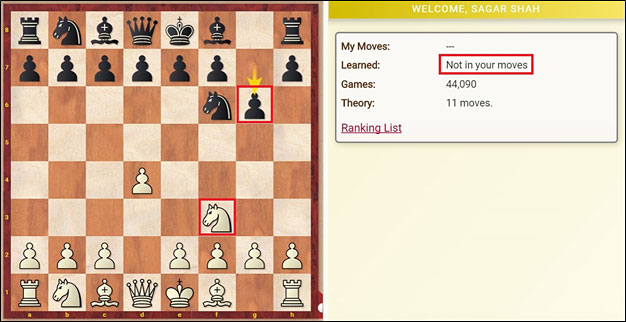
2.Nf3. If you deviate the trainer shows a message saying “not in your
moves” but plays on until it has moves in the live book.
The move 2.Nf3 is not in your repertoire and
hence on your right you can see the words
“Not in your moves”. Yet the trainer continues playing and makes
the move 2…g6.
The training ends when the moves in the live book end. If you like the
new line you can just mark the final move as your move and add it to your
white repertoire. Of course, everything that was written above remains true
for building a black repertoire too.
Below the notation pane you can see many important functions in the openings
trainer. You can download the PGN file, insert text between moves, delete
or cut a line or use the annotations palette
When you start marking a lot of moves, the size of your repertoire will
increase and then the Openings Trainer will have more options to drill you.
You will have your entire opening preparation in one place and also the
chance to regularly test yourself on it. This will translate into more tournament
points as you will remember your variations better and not forget them in
the crucial games!
Video tutorial
Second video on some advanced functions of the Openings Trainer
Sagar ShahSagar is an International Master from India with two GM norms. He loves to cover chess tournaments, as that helps him understand and improve at the game he loves so much. He is the co-founder and CEO of ChessBase India, the biggest chess news portal in the country. His YouTube channel has over a million subscribers, and to date close to a billion views. ChessBase India is the sole distributor of ChessBase products in India and seven adjoining countries, where the software is available at a 60% discount. compared to International prices.
I have a problem with drill that same line is repeated most number of time and do not move to next variation. And even if moved to next variation it will be once or twice and will come back to same line. Please let me know the problem.
Thanks
mkonst 8/12/2017 09:44
Pfatzer you are right. I also pointed out this Opening Training behavior but i got no answer. I believe in general Chessbase need to add the possibility of choice which variation should be drilling by the user. Of course it is not easy because of the multiple of subvariations but at least in order someone to be able to be practiced, Chessbase needs to find a solution on this.
pfatzer 8/11/2017 10:53
The openings trainer doesn't work very well, since the drilling mode does not use the actual frequency of the moves, but the frequency of the resulting position. For example if you try to drill black from the position after 1.Nf3 c5 the openings trainer almost always plays 2.e4 although it only occurs in about 9% of the games. This happens, because there are lots of Open Sicilians in the database. In real life 2.c4 and 2.g3 are much more common.
Also after 1.c4 Nf6 the "drill black" feature almost always plays 2.d4 even though it's the fourth most common move in this position and it happens only in about 4% of the games.
Also after 1.d4 d5 2.c4 c6 3.Nc3 Nf6 the opening trainer claims that 4.Nf3 occurs almost four times as often as 4.e3 although in real life they occur about equally often.
This needs to be fixed, otherwise the tool is mostly useless for any real opening training.
K_Kara87 12/12/2015 07:38
kyi when you bought chessbase 13 you already got some months of chessbase membership for free.
kyi 12/5/2015 09:59
I own chessbase 13. Do I need to be a member of chessbase to fully untilize the Openings trainer ?
Maty 11/30/2015 10:40
Im a premium member, and what I dont find, is the possibility of adding games as references (on Chessbase software is the "add to notation" or "copy to notation" option I think). Can anyone tell me where to find this option? Thanks.
MarriedRhombus 11/30/2015 10:13
This is nice. Can a coach share a repertoire? I depend so much to my coach for building my repertoire.
YOUR PERSONAL CHESS COACH - Whether you’re taking your first steps into the world of club chess, or already playing at a tournament level: with FRITZ, you can train more efficiently, intelligently and with a more personalised approach than ever before.
The Hyper-Accelerated Dragon is fast, from the very first moves, your bishop heads to g7, seizes the long diagonal, and turns into the most feared piece on the board.
It rewards players who love initiative and clear attacking plans.
The Hyper-Accelerated Dragon is fast, from the very first moves, your bishop heads to g7, seizes the long diagonal, and turns into the most feared piece on the board.
It rewards players who love initiative and clear attacking plans.
The Hyper-Accelerated dragon is fast, from the very first moves, your bishop heads to g7, seizes the long diagonal, and turns into the most feared piece on the board.
It rewards players who love initiative and clear attacking plans.
“Mate is great!” – Tactical training with Oliver Reeh, “The 8th rank” – Andy Woodward analyses his game against Magnus Carlsen from TePe Sigeman 2026, “A modern Nimzo-Indian” – Andrei Volokitin introduces readers to "his" system and much more!
Chess is a concrete game. There is no way around training your calculation skills. Improve your visualization, pattern recognition and learn calculation techniques such as reciprocal thinking with this course.
This compact course is designed specifically for practical play. Instead of overwhelming you with endless theory, it focuses on the critical lines, typical plans, and recurring tactical ideas.
Slav and Semi-Slav Powerbase 2026 is a database and contains a total of 11 766 games from Mega 2026 or the Correspondence Database 2026, of which 1136 are annotated.
€9.90
We use cookies and comparable technologies to provide certain functions, to improve the user experience and to offer interest-oriented content. Depending on their intended use, analysis cookies and marketing cookies may be used in addition to technically required cookies. Here you can make detailed settings or revoke your consent (if necessary partially) with effect for the future. Further information can be found in our data protection declaration.
Pop-up for detailed settings
We use cookies and comparable technologies to provide certain functions, to improve the user experience and to offer interest-oriented content. Depending on their intended use, cookies may be used in addition to technically required cookies, analysis cookies and marketing cookies. You can decide which cookies to use by selecting the appropriate options below. Please note that your selection may affect the functionality of the service. Further information can be found in our privacy policy.
Technically required cookies
Technically required cookies: so that you can navigate and use the basic functions and store preferences.
Analysis Cookies
To help us determine how visitors interact with our website to improve the user experience.
Marketing-Cookies
To help us offer and evaluate relevant content and interesting and appropriate advertisement.